Home / How to Create Service Area Pages
- Local SEO guide
How to Create Service Area Pages That Actually Help Local SEO
A step-by-step process for planning, writing and linking service area pages that customers find useful, without falling into thin, duplicate or doorway-style location pages.
- By Arslan Kalwar
- October 15, 2026
- 13 min read
- Quick answer
The short version
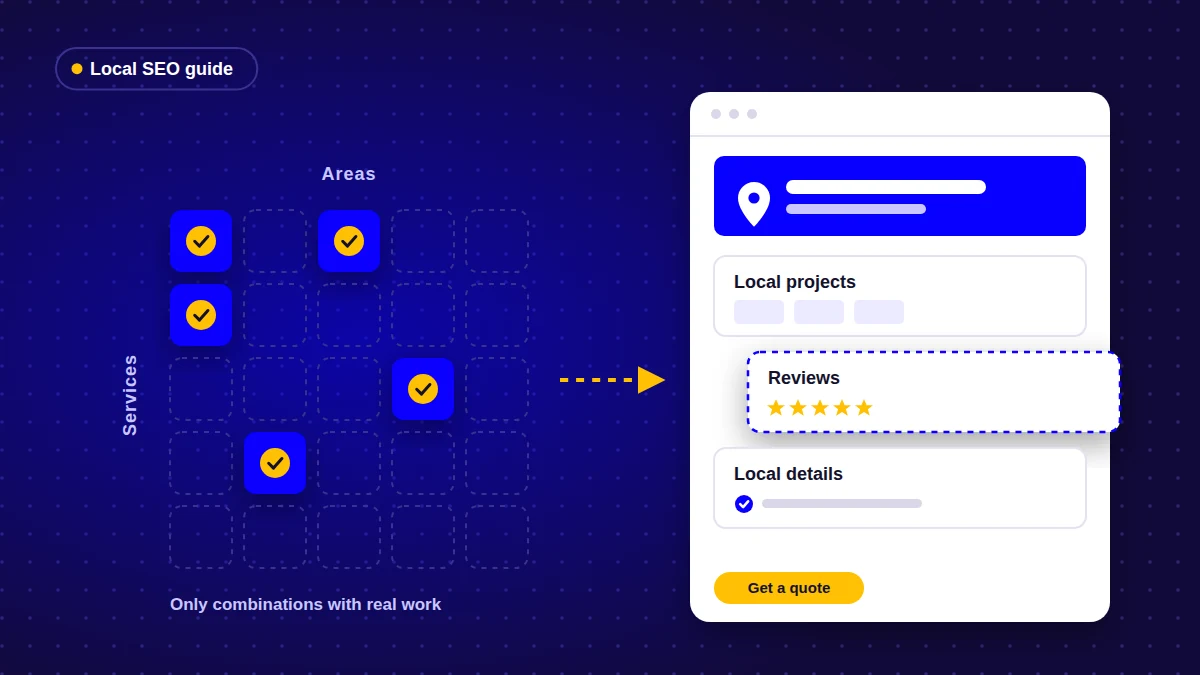
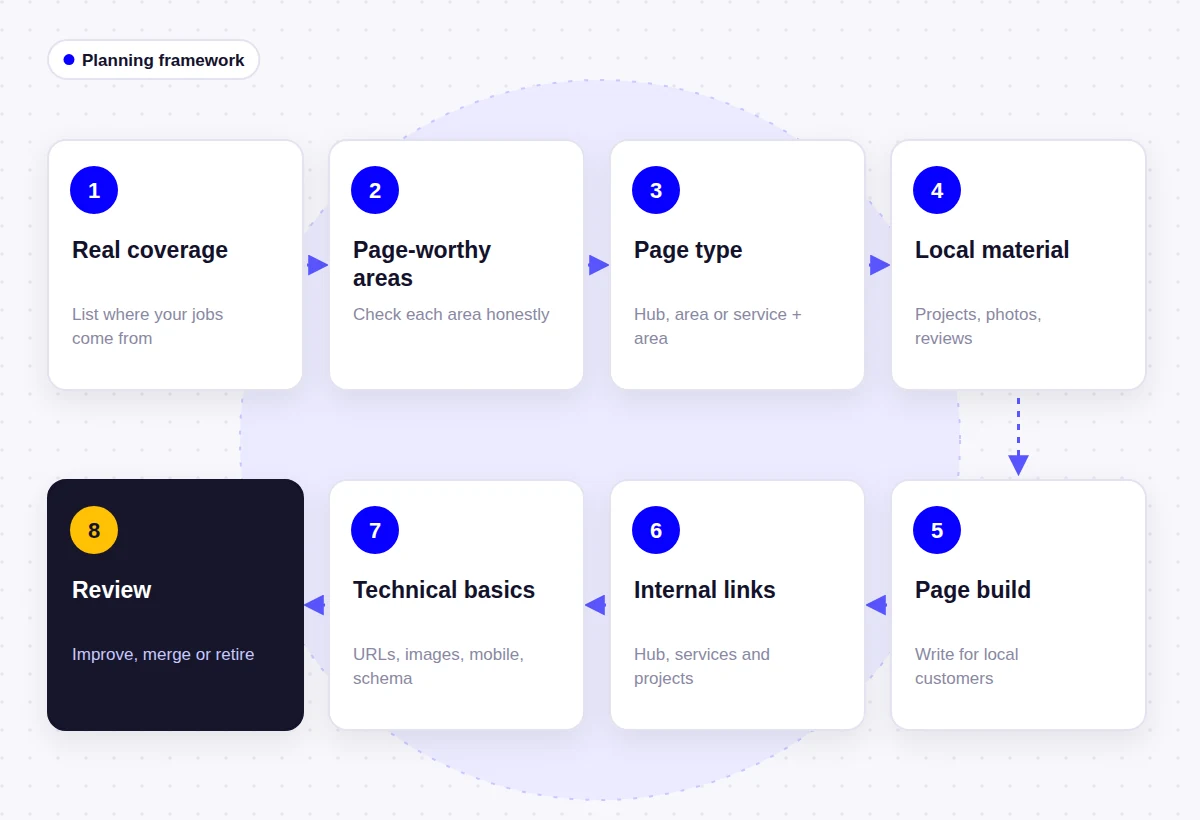
Good service area pages are planned from your real jobs, not from a list of towns. The process I use has eight steps:
- List where you actually work, using job records and your Google Business Profile service area
- Decide which areas deserve their own page, and group the rest on your service areas hub
- Choose the right page type for each: hub, area page, or service + area page
- Collect local material first: projects, photos, reviews and real local differences
- Build each page around what customers in that area need to know, with a clear title, H1 and call to action
- Link the pages to your hub, your service pages and your projects
- Get the technical basics right: URLs, images, mobile layout and structured data
- Measure each page in Search Console and improve, merge or remove the weak ones
If you are still deciding whether your business needs these pages at all, start with my explainer on what service area pages are and who needs them. This guide assumes you have decided that at least some area pages make sense.
The Process at a Glance
| Step | What to do | What you end up with |
|---|---|---|
| 1. Real coverage | List the areas you actually serve and where your jobs come from | A short, honest list of areas |
| 2. Page-worthy areas | Check each area against a few simple questions | A shortlist of areas that justify a page |
| 3. Page type | Decide between hub, area page and service + area page | A page plan with URLs |
| 4. Local material | Gather projects, photos, reviews and local details | A content folder for each page |
| 5. Page build | Write and design each page around that material | Finished pages with a clear purpose |
| 6. Internal links | Connect hub, area pages, services and projects | A structure visitors can browse |
| 7. Technical basics | URLs, images, mobile, schema, indexing | Pages Google can crawl and understand |
| 8. Review | Measure, improve, merge or retire pages | A small set of pages that keep earning their place |
Step 1: Start With Where You Actually Work
Before anyone opens WordPress, I ask the business owner for a list of places their last year or two of jobs came from. Invoices, a job management system or even a spreadsheet of postcodes is enough. This usually produces a much shorter and more useful list than “every town within 50 miles”.
Check that list against your Google Business Profile. Google’s Business Profile guidelines say a service area should generally stay within about two hours of driving time from where the business is based, although larger areas can be appropriate for some businesses. Your website and your profile should describe the same coverage.
Then mark three things next to each area:
- Volume: roughly how much of your work comes from it
- Priority: whether you want more work there (for example, it is close to your base or has the property types you specialize in)
- Overlap: whether it is really part of a larger area customers think of as one place, such as a county, borough or district
Handling overlapping areas
If several small towns blend into each other, or customers describe their location by the county rather than the town, cover them on one page named after the area people actually use. One solid page for a county is better than six thin pages for villages inside it.
Step 2: Decide Which Areas Deserve Their Own Page
Every area you serve belongs on your service areas hub. Only some of them deserve their own page. I use these questions for each candidate area:
| Question | Create a page if | Keep it on the hub if |
|---|---|---|
| Do you regularly complete jobs there? | Yes, and you can show some of them | You have done little or no work there yet |
| Do you have photos or project write-ups from the area? | Yes, real ones from real jobs | You would need stock photos |
| Do you have reviews from customers in or near the area? | Yes, with permission to use them | All your reviews come from elsewhere |
| Does anything differ there (property types, regulations, access, response time, services offered)? | Yes, and it affects the customer | Everything is the same as everywhere else |
| Do people search for your service with this place name? | Yes, it is how customers look for you | Nobody uses the place name in searches |
| Could you write about it without making things up? | Yes | No: this is the deciding question |
An area that gets mostly “keep it on the hub” answers is not a failure. It simply means a dedicated page would have nothing to say yet. Revisit it once you have completed a few jobs there.
How many pages to start with
Start smaller than you think. Some experienced local SEO practitioners suggest an upper limit of roughly 10 to 15 city pages for a typical service area business. That is an opinion rather than a rule, but it points in the right direction. I would rather launch with three strong area pages and add more as real work comes in than launch with forty that nobody reads.
Step 3: Choose the Right Page Type for Each Area
There are three common page types. Pick the simplest one that answers the customer’s question.
| Page type | Use it when | Example URL pattern |
|---|---|---|
| Service areas hub | Always, if you travel to customers. It lists every area and links to any area pages | /service-areas/ |
| Area page | You have real work and local details for an area, across several services | /service-areas/area-name/ |
| Service + area page | One service has its own demand, proof and details in that area | /service-name-area-name/ |
Service + area pages are where most sites go wrong, because the combinations multiply quickly. Six services across ten towns is sixty pages, and almost nobody has sixty pages worth of genuinely different material. Create one only when that combination has its own evidence, such as a run of jobs, specific local conditions, or a service you offer only in that area.
Also check that each page has a different job from your existing service pages. If your roof repair page already targets your main area well, a separate “roof repair in [same area]” page will mostly compete with it.
Step 4: Collect Local Material Before You Write
The quality of an area page depends far more on the material behind it than on the writing. Gather this first, and only build pages for the areas where you end up with something real.
| Material | What it looks like on the page |
|---|---|
| Completed jobs | Short project summaries: the problem, the work done, the result in plain words |
| Photos | Your own before-and-after, team and site photos from that area |
| Reviews | Genuine reviews from customers in or near the area, ideally linked to their source |
| Local conditions | Common property types, typical problems, seasonal issues, access or parking constraints |
| Rules and processes | Permits or local requirements, where they genuinely apply to your service |
| Practical details | Response times, which services are available there, any travel or minimum charges |
| Customer questions | Questions people from that area actually ask on the phone |
Do not invent local detail
Padding a page with facts about the town’s history, population or landmarks rarely helps a customer choose a contractor. Worse, made-up claims (“serving Springfield for 20 years”) damage trust. If you cannot find real material for an area, that is your answer: it does not need its own page yet.
Step 5: Build the Page Around What Customers Need
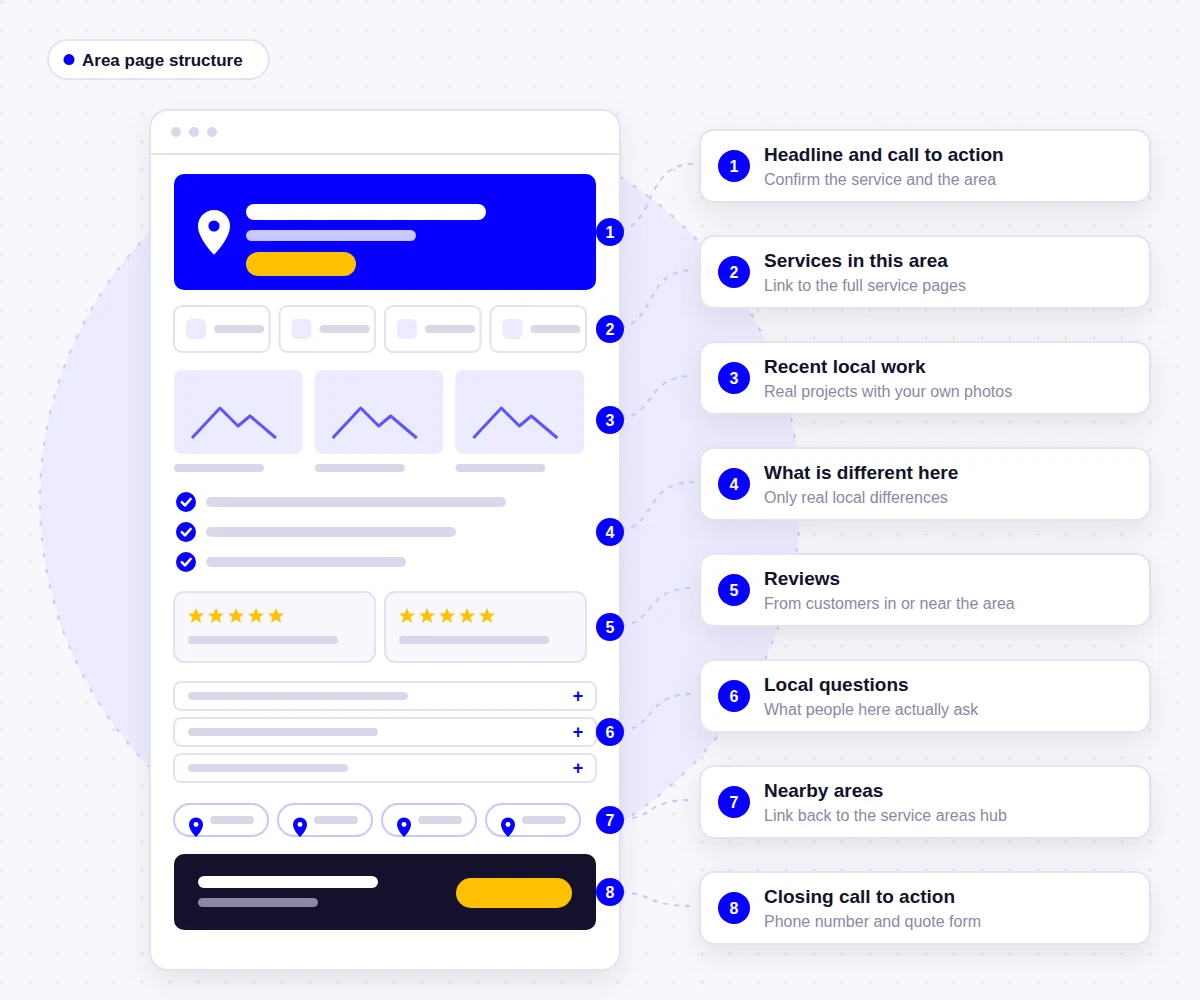
A good area page reads like a useful briefing for someone in that area, not a list of keywords. This is the structure I start from, adjusted to the business and the material available:
- Headline and short intro confirming the service and area, with a phone number and main call to action
- Services available in this area, each linking to its full service page
- Recent work in the area: two or three project summaries with photos
- What is different locally, if anything: property types, conditions, rules, response times
- Reviews from customers in or near the area
- Area-specific questions, answered briefly
- Nearby areas covered, linking back to the hub
- Closing call to action with phone and form
Write the title, H1 and meta description
Keep these simple and accurate. Google’s SEO Starter Guide asks for titles that are unique, clear and concise, and descriptions that summarize the page. For an area page, that usually means the main service and the area name, written for a person.
| Element | Clear | Keyword-stuffed |
|---|---|---|
| Title tag | Roofing in Lake County, IL | Company Name | Roofer Lake County Roofing Lake County Roof Repair Lake County |
| H1 | Roofing Services in Lake County | Best Lake County Roofer Near Me Lake County IL |
| Meta description | Roof repairs and replacements across Lake County, with recent local projects, reviews and free inspections. | Lake County roofer. Roofing Lake County. Call the #1 Lake County roofing company now. |
Only mention a free inspection, a guarantee or a response time if the business really offers it in that area.
Write local content without city-name swapping
Templates are fine for layout. They are a problem for content. Before publishing, I run a simple check: cover the area name everywhere on the page and read it again. If every paragraph would be equally true for any other town, the page is not yet about that area. Replace generic paragraphs with project summaries, local questions and real differences until the page passes.
Some sections can repeat across pages. Your guarantee, your process and your licensing do not change from town to town, and Google’s canonicalization documentation notes that some duplicate content on a site is normal. The problem is when the repeated parts are the whole page. Aim for the local sections to be the main reason the page exists.
Step 6: Connect the Pages With Internal Links
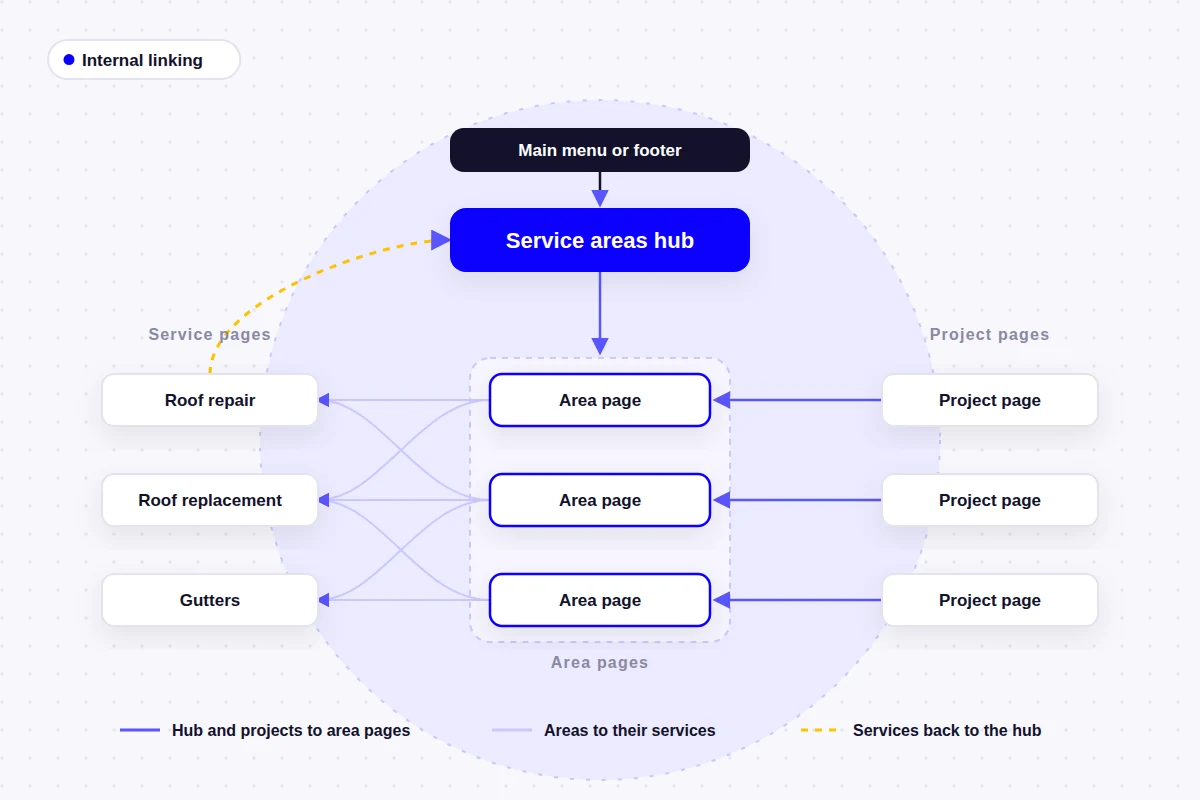
Area pages that are only reachable through an XML sitemap look exactly like doorway pages, to visitors and to search engines. Give them a clear place in the site structure:
- Hub to area pages: the service areas page links to every area page, with a line about each
- Area pages to services: each area page links to the full service pages for the services offered there
- Services to hub: each service page mentions where you work and links to the hub
- Projects to areas: project write-ups link to the area they were completed in
- Area pages to neighbors: link to nearby area pages only where it helps someone near a border
- Navigation: link the hub from the main menu or footer. Individual area pages rarely need to be in the main menu.
This is the same idea behind my own service areas page, which connects the regions I work in to real projects in those places rather than listing places on their own.
Step 7: Get the Technical Basics Right
- URLs: short and consistent, for example /service-areas/area-name/. Avoid changing them later without 301 redirects.
- Images: real photos, compressed and correctly sized, with descriptive filenames and alt text that describe the image, not a list of keywords.
- Mobile layout: many local searches happen on phones, so keep the phone number and form easy to reach. Google uses the mobile version of a page for indexing (mobile-first indexing).
- Indexing: leave area pages indexable, include them in your XML sitemap, and let each one use its own self-referencing canonical (Yoast does this by default).
- Structured data: on WordPress, Yoast already outputs the page, breadcrumb and organization markup. Google’s LocalBusiness documentation lists a physical address as required, so do not add LocalBusiness markup with an address you do not operate from.
- Business details: keep your business name, phone number and service area consistent with your Google Business Profile.
If you want a second pair of eyes on the technical side, this is the kind of work covered by my WordPress SEO services.
Step 8: Measure, Review and Maintain
Service area pages are not finished on launch day. Every few months I check each one:
- Search Console: filter the Performance report by page to see which searches each area page appears for, and whether it gets clicks
- Analytics: check whether visitors who land on area pages call or submit the form (track these as key events)
- Content: add new projects, photos and reviews from the area as they come in
- Accuracy: update the page if services, response times or coverage change
- Pruning: if a page gets no impressions after a reasonable period and you cannot improve it, merge it into the hub and redirect the old URL
Keeping these pages current is part of normal site upkeep, which is why I include content checks alongside updates and backups in WordPress maintenance work.
Mistakes That Turn Area Pages Into Doorway Pages
Google’s spam policies name pages targeted at specific regions or cities that funnel users to one page as an example of doorway abuse, and they describe scaled content abuse as many pages generated mainly to manipulate rankings. In practice, these are the mistakes that put area pages in that territory:
- Generating dozens of pages from one template, with only the town name changed
- Creating pages for places you do not actually serve
- Writing pages whose only real content is a list of keywords and a contact form
- Hiding area pages from visitors and relying on the sitemap to get them indexed
- Using AI or spinning tools to produce “unique” versions of the same page without adding real information
- Claiming an office, address or years of local history that do not exist
The same rules apply across trades. A plumbing website, an HVAC website or a pest control website all benefit from area pages only when there is real local work to show.
Service Area Page Checklist
Run through this list before publishing each new area page.
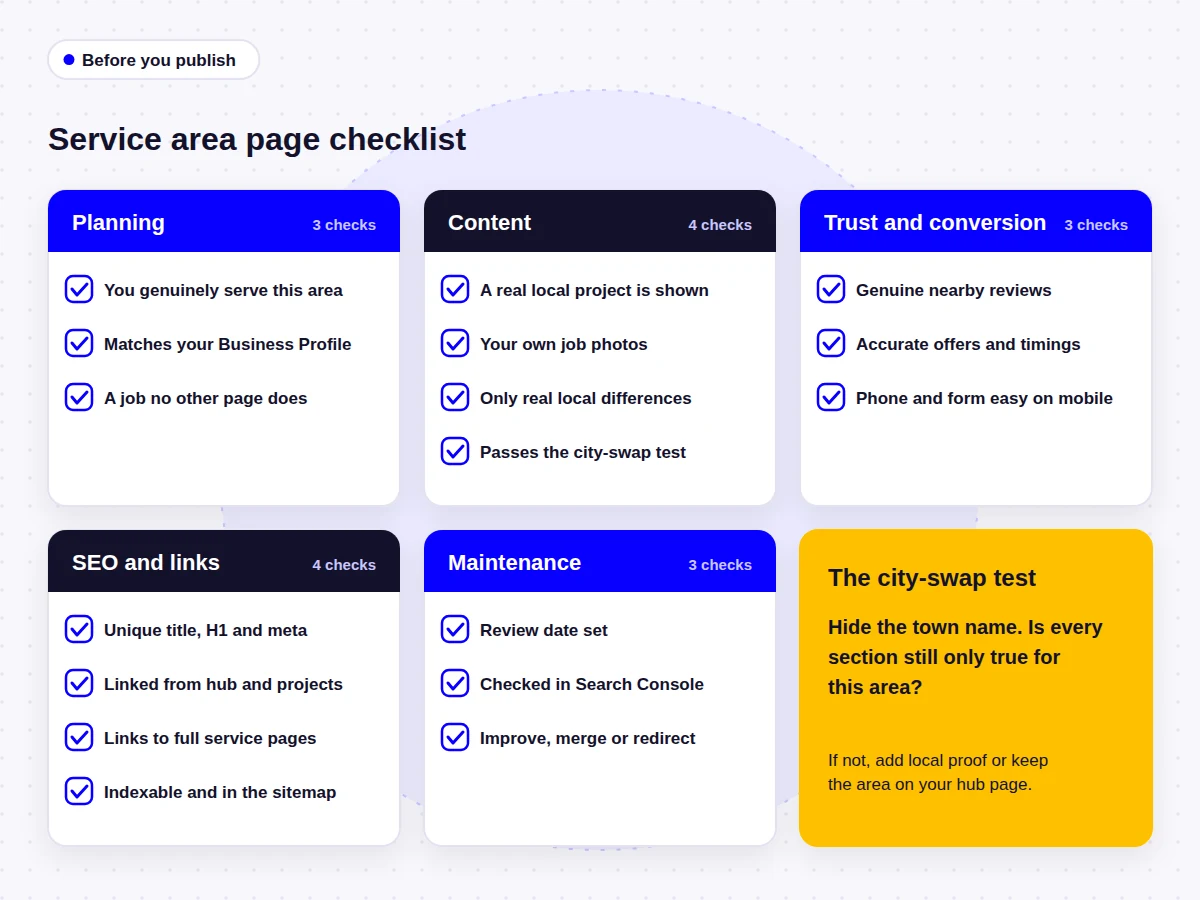
Planning
- The business genuinely serves this area
- The area is consistent with the Google Business Profile service area
- The page has a job no other page on the site already does
Content
- At least one real project or job from the area is shown
- Photos are your own, from real jobs
- Local differences are real and explained, or left out
- The page passes the city-swap test
Trust and conversion
- Reviews come from real customers, ideally in or near the area
- Offers, guarantees and response times are accurate for this area
- Phone number and form are easy to reach on mobile
SEO and links
- Unique title, H1 and meta description, written for people
- Linked from the service areas hub and relevant projects
- Links to the full service pages for services offered there
- Indexable, in the XML sitemap, with a self-referencing canonical
Maintenance
- A review date is set for the page
- Performance is checked in Search Console
- Weak pages are improved, merged or redirected
Frequently Asked Questions
There is no percentage or word count that Google publishes. A better test is whether the local parts, such as projects, photos, reviews and real local differences, are the main reason the page exists. If the page would be equally true for any town after removing the place name, it needs more local substance.
Start with one service areas hub, then add individual pages only for areas where you have real work and local information to show. Many small service businesses need only a handful. Some practitioners suggest 10 to 15 as a practical upper limit, but the right number depends on how much genuine local material you have.
Some shared content is fine, such as your guarantee, process or licensing. Problems start when the shared content is most of the page. Keep repeated sections short and make the local sections do the work.
Yes, when those towns form one area customers think of together, such as a county or district, and you serve them in the same way. Grouping small neighboring towns usually produces a stronger page than splitting them into thin individual pages.
Usually the service areas hub belongs in the main menu or footer, and individual area pages are linked from the hub, from relevant service pages and from projects. Putting every area page in the main menu tends to clutter it without helping visitors.
They do not need backlinks to be useful or to be indexed. Strong internal links from your hub, services and projects matter more for most small businesses. Genuine local links, such as a supplier, association or local news mention, can help, but are not required.
First check whether they can be improved with real local projects and reviews. If not, merge them into the service areas hub and add a 301 redirect from the old URL, so any visitors or links still reach a relevant page.
Fewer, Better Pages
The service area pages that help local SEO are the ones that would still be worth having if search engines did not exist: they tell a customer in that area what you do there, show work you have done nearby and make it easy to get in touch. Build those pages from real jobs, link them properly and review them regularly. Skip the rest.
If you need to go back a step, my explainer on what service area pages are covers the terminology and how to decide whether your business needs them. For examples of how coverage has been handled on real projects, browse the portfolio, or see the contractor website design page for how I plan sites for trades.
- About the author
Arslan Kalwar is a WordPress website designer and SEO specialist. He has worked with WordPress for more than eight years, completed over 1,200 projects, and contributed to WordPress core. Most of his work is for contractors, trades and other service businesses, including planning how their services and service areas are structured. More about Arslan.
Need Help Planning Your Local Business Website?
I plan and build WordPress websites with clear service pages, service area structures built from real coverage, on-page SEO and simple conversion paths. If you are not sure which area pages your business needs, send me a list of where you work and I will suggest a structure.