Home / Small Business Website Guide
- Website planning guide
What Should a Small Business Website Include?
A practical, page-by-page guide to what a small business website needs: the essential pages, what goes on each one, the trust and contact details customers look for, and the technical basics to check before launch.
- By Arslan Kalwar
- October 8, 2026
- 17 min read
- Quick answer
The short answer
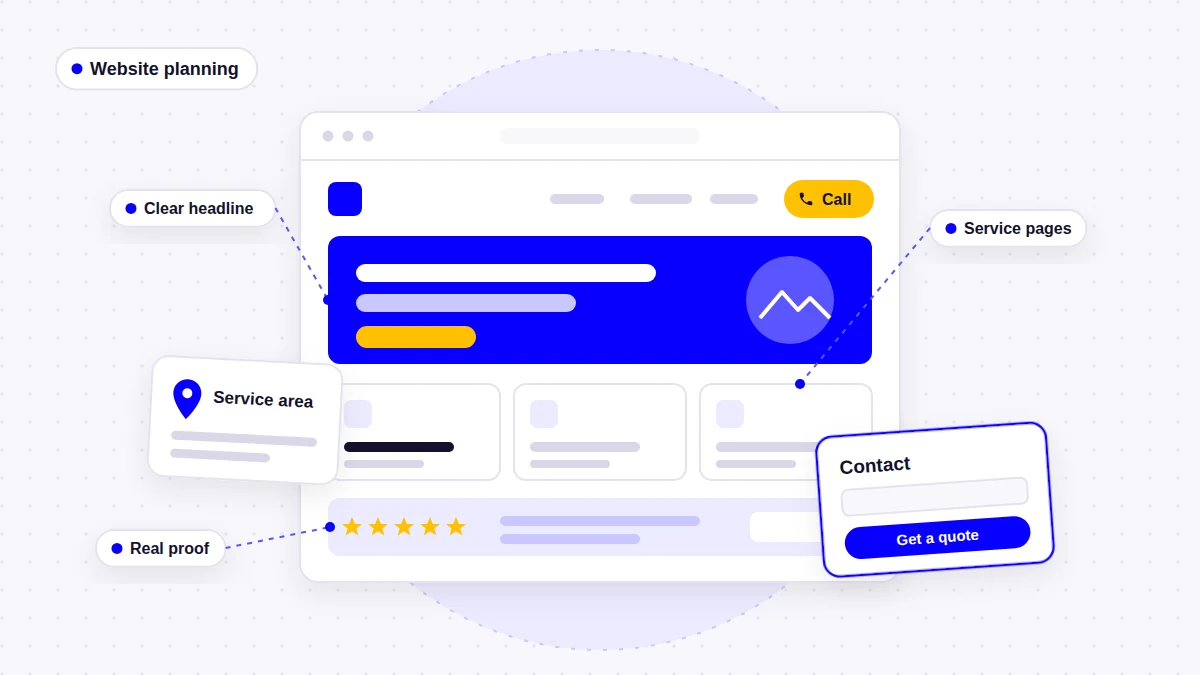
A small business website should make three things obvious within a few seconds: what you do, where you do it, and how to get in touch. In practice, that means it should include:
- A homepage that states your main services, your area and your phone number on the first screen
- A separate page for each main service, so each one can answer its own questions and be found in search
- An about page with the real people, credentials and history behind the business
- A contact page with a tappable phone number, a short form, your hours and what happens next
- Proof: real job photos, genuine reviews and examples of finished work
- A clear call to action on every page, not only on the contact page
- A mobile-friendly, fast and accessible build on a secure (HTTPS) connection
- The SEO basics: unique page titles and descriptions, clear headings and a sitemap submitted to Google
- A privacy policy and analytics that track inquiries, not just visits
Service businesses that travel to customers, such as roofers, plumbers or electricians, should also make their service area clear. The rest of this guide explains each of these points, what to put on every page, and what you can safely leave out.
Start With the Three Jobs Your Website Has to Do
I have been building WordPress websites for more than eight years, mostly for contractors, trades and other service businesses. When a client asks me to rebuild a site, the problem is rarely the colors or the fonts. It is usually that the site fails at one of three basic jobs:
- Explain. A visitor should understand what you offer and where you work without scrolling or guessing.
- Prove. The site should show that you are a real, capable business: real photos, real reviews, real credentials.
- Convert. Getting in touch should take one tap or a short form, from any page, on any device.
A fourth job sits underneath all three: the site has to be findable. That is where structure and SEO come in. Every page and feature below supports at least one of these jobs. If something supports none of them, it probably does not need to be on your website yet.
The Essential Pages for a Small Business Website
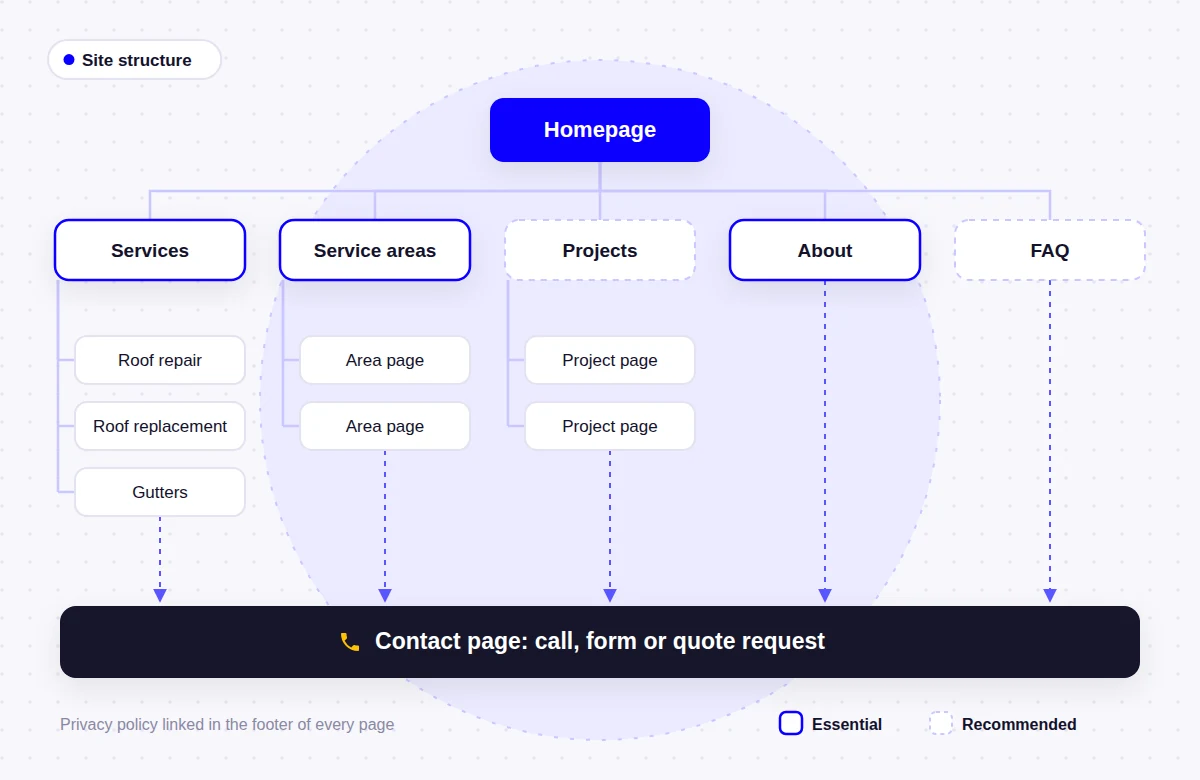
Most small business websites need the same core pages. The table below shows which pages are essential, which are recommended and what each one should contain.
| Page | Priority | Purpose | What it should include |
|---|---|---|---|
| Homepage | Essential | Tells visitors what you do and sends them to the right page | Main services, service area, phone number, proof, a clear call to action |
| Service pages (one per main service) | Essential | Answers the questions behind each type of job | What is included, process, photos, FAQs, call to action |
| About | Essential | Shows who is behind the business | People, history, licenses or insurance (where they apply), values |
| Contact | Essential | Makes getting in touch easy | Phone, short form, email, hours, area or address, response time |
| Privacy policy | Essential | Explains how personal data from forms and analytics is used | What you collect, why, how long you keep it, who to contact |
| Service area page(s) | Essential if you travel to customers | Shows where you work | Towns or regions served, local projects, area-specific details |
| Projects or gallery | Recommended | Shows the quality of your work | Real job photos, short project notes, location where appropriate |
| Reviews | Recommended | Lets past customers vouch for you | Genuine reviews, ideally linked to their source |
| FAQ | Recommended | Answers common questions before the call | Pricing factors, timelines, guarantees you actually offer |
| Blog or guides | Optional | Answers wider questions and supports SEO | Practical articles based on real customer questions |
How many pages does a small business website need?
There is no correct number. Google’s own SEO Starter Guide is clear that there is no magic word count, and the same logic applies to page count. A better way to work it out is:
- 1 homepage
- + 1 page for each service you want to be hired for
- + an about page, a contact page and a privacy policy
- + a service areas page, plus individual area pages only where you have something specific to say
- + projects, reviews or FAQs if you have the material for them
For a plumber offering six main services across one county, that usually lands somewhere around 10 to 15 pages. For a solo consultant with a single service, five pages can be enough. Add pages because customers need them, not to make the site look bigger.
What a Small Business Homepage Should Include
Your homepage works more like a reception desk than a brochure. Most visitors arrive with one question, and the homepage should either answer it or send them to the page that does. Here is what I put on almost every service business homepage:
- A clear first screen. A headline that names the service and the area (for example, “Roof Repair and Replacement in [Your County]”), a short supporting line, and a primary button plus a tappable phone number.
- A services overview. Short cards that link to each service page. Do not try to explain every service in full on the homepage.
- Proof near the top. A few genuine reviews, real project photos, and credentials such as licensing or insurance where they apply to your trade.
- Where you work. A short summary of your service area, linked to the full list.
- How it works. Three or four steps from first contact to finished job. This removes a lot of uncertainty for first-time customers.
- A second call to action near the bottom, for visitors who read everything before deciding.
- A useful footer with your business name, phone, email, hours, service area or address, and links to key pages.
A common homepage mistake
Sliders with three rotating messages, a generic “Welcome to our website” headline, and a stock photo of a handshake. None of these tell the visitor what you do or where. A plain, specific headline almost always does a better job.
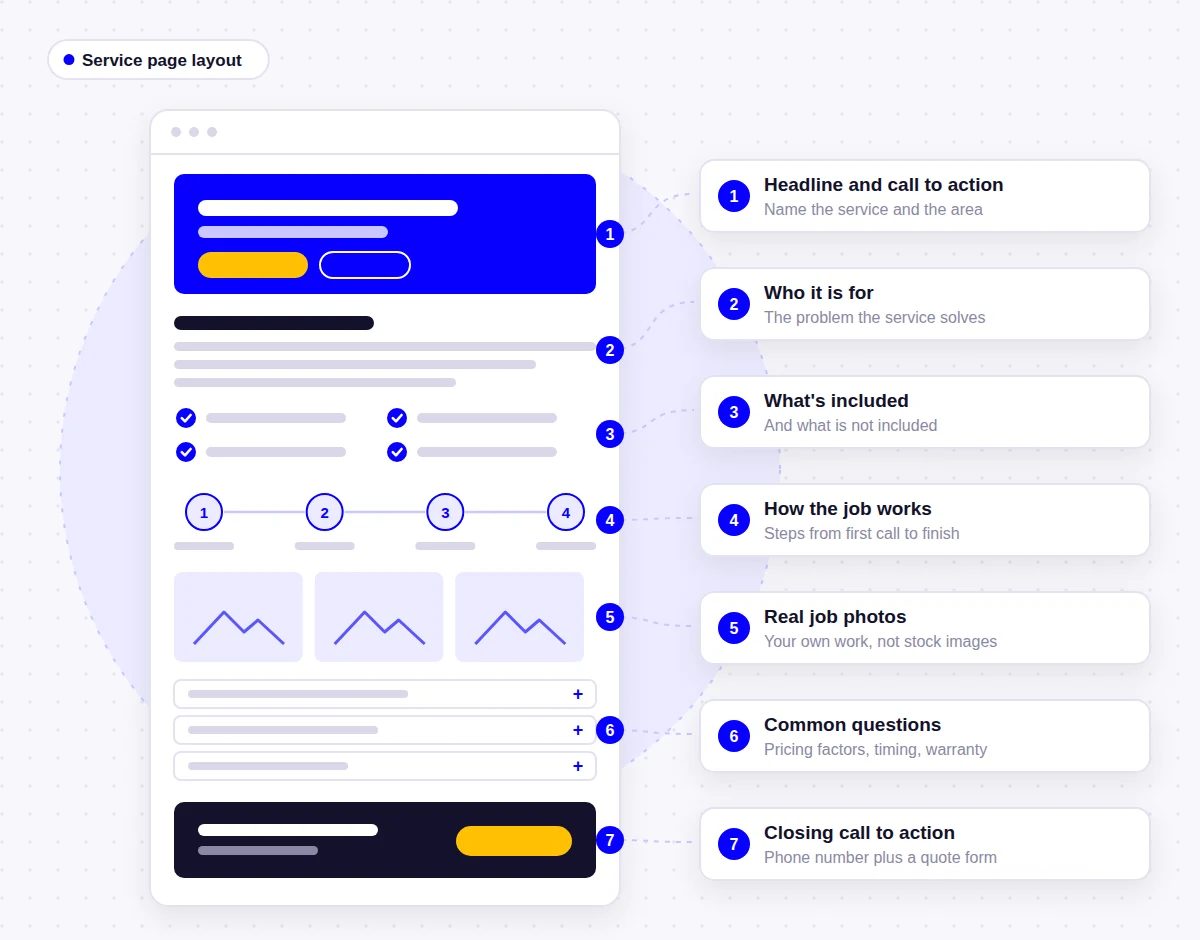
What a Service Page Should Include
If I had to pick the most important part of a service business website, it would be the service pages. Each service is a different search and often a different customer. Someone with a leaking roof after a storm wants different information from someone planning a full replacement next spring. When both are squeezed onto one “Services” page, neither gets a proper answer, and neither page has much chance of appearing in search.
This is why the Starhawk Roofing website gives each of its nine services, from roof repair to gutters and siding, its own page. A good service page includes:
- A headline that names the service (and the area, if it matters to the search)
- Who the service is for and the problem it solves
- What is included, and what is not
- How the job works, step by step
- Photos of real jobs of this type
- Pricing factors or a price range, if you are comfortable sharing it
- Answers to the three to five questions customers ask most about this service
- A call to action that fits the service, such as “Book an inspection” or “Request a quote”
- Links to related services and to your service area page
Avoid thin service pages
A separate page only helps if it has something to say. Ten pages with the same paragraph and a different service name swapped in will not help visitors or search engines. If you cannot write a useful page about a service yet, list it on a broader page until you can.
About and Contact Pages
What the about page should include
People hire people, especially when someone is coming into their home. The about page is where you show who they will be dealing with. Include:
- The owner or team, with real photos if possible
- How long you have been in business (only if it is accurate)
- Licenses, insurance, memberships or certifications that genuinely apply to your work
- Where you are based and the areas you cover
- How you work, in plain language, and what customers can expect from you
What information should be on a contact page
- A tappable phone number at the top of the page
- A short form that asks only for what you need to reply (name, phone or email, and a short message is often enough)
- Your email address, for people who prefer it
- Opening hours, and whether you take emergency or after-hours calls
- Your address if customers visit you, or your service area if you travel to them
- What happens next, such as “We reply within one business day”, if you can actually keep that promise
Every form field should have a visible label, and the form should be easy to complete with a keyboard. If you use a spam filter, choose one that does not make real customers solve puzzles before they can contact you.
Service Area Pages: When They Help and When They Do Not
If you travel to customers, your website needs to say where you work. Google’s Business Profile guidelines describe service-area businesses as businesses that serve customers at their locations, and they ask businesses run from a home address, such as a plumber working from home, to hide that address and set a service area instead. Your website should match what your profile says.
How you present those areas matters:
- Always: list the towns, counties or regions you serve on a service areas page, and mention your main area on the homepage and in the footer.
- Sometimes: create individual area pages when you have something specific to say about that area, such as projects completed there, local building conditions, or services you only offer in certain places.
- Avoid: dozens of near-identical pages where only the town name changes. Google’s spam policies give pages targeted at specific regions or cities that funnel users to one page as an example of doorway abuse.
On the Complete Coast Plumbing website, for example, the suburbs served across the Central Coast are part of the site structure rather than a list of copy-and-paste pages. My own service areas page follows the same idea: it explains where I work and links to real projects in those places.
Trust Signals Customers Actually Look For
Trust signals are the details that tell a visitor you are a real, reliable business. The useful ones are specific and checkable. The weak ones are vague or impossible to verify.
| Helpful trust signals | Weak or risky trust signals |
|---|---|
| Photos of your own jobs, team and vehicles | Stock photos of smiling models or handshakes |
| Genuine reviews, linked to Google or another source | Unattributed quotes that could have been written by anyone |
| License or registration numbers where your trade requires them | Badges for awards or memberships you cannot back up |
| Warranty or guarantee terms that you actually offer | Claims like “#1 in the area” or “guaranteed results” |
| Named people and a real business address or service area | No names, no location, only a contact form |
| Finished project examples with short descriptions | A gallery of images taken from other websites |
Calls to Action and the Path to an Inquiry
A call to action is the next step you want the visitor to take: call, request a quote, book a visit. On a service business website, the path from landing on a page to contacting you should be short and obvious on every page.
- Give each page one main action, with the phone number as a constant second option
- Repeat the call to action after key sections, not only at the very bottom
- Use button text that says what happens, such as “Request a Roof Inspection”, rather than “Submit” or “Learn More”
- Only say “free” if the estimate or inspection really is free
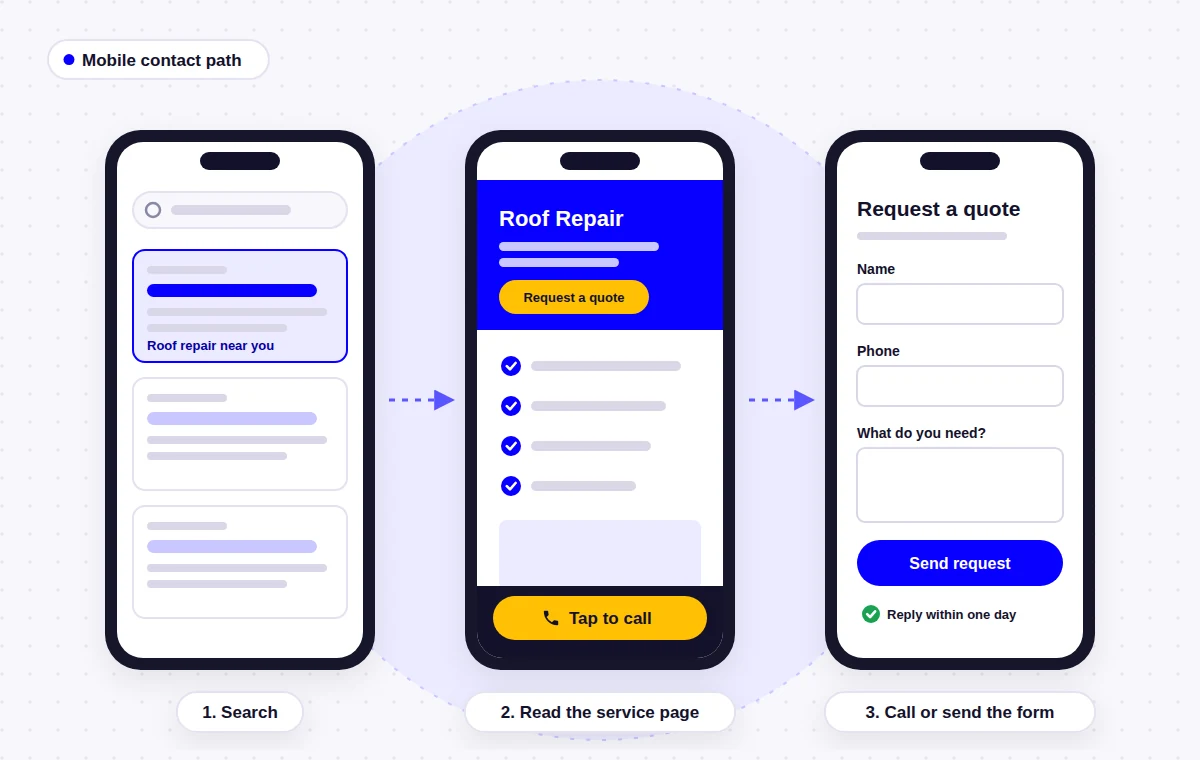
- On mobile, keep the phone number in the header or in a fixed call bar that does not cover content
Mobile, Speed and Accessibility
Mobile-friendly design
For most local service businesses, a large share of visitors arrive on a phone, often in a hurry. Google also uses the mobile version of a site for indexing, which it calls mobile-first indexing. A mobile-friendly website is not just a smaller version of the desktop site. It needs:
- A tappable phone number and main button visible without scrolling
- Text that is readable without zooming
- Buttons and links large enough to tap. WCAG 2.2 sets a minimum target size of 24 by 24 CSS pixels, with some exceptions; I aim for larger on main buttons
- Forms that bring up the right keyboard (numbers for phone fields, email keyboard for email fields)
- No pop-ups that cover the page as soon as it loads
Website speed and Core Web Vitals
Google measures page experience through Core Web Vitals. According to web.dev, a page is considered good when at least 75 percent of visits meet these thresholds:
| Metric | What it measures | Good |
|---|---|---|
| Largest Contentful Paint (LCP) | How quickly the main content appears | 2.5 seconds or less |
| Interaction to Next Paint (INP) | How quickly the page responds to taps and clicks | 200 milliseconds or less |
| Cumulative Layout Shift (CLS) | How much the layout jumps around while loading | 0.1 or less |
On WordPress, the usual causes of a slow site are oversized images, too many plugins, heavy sliders and cheap hosting. Compress and correctly size your images, remove plugins you do not use, and test important pages with PageSpeed Insights on a mobile connection before launch.
Accessibility
An accessible website can be used by people with visual, motor, hearing or cognitive impairments, and it is usually easier for everyone else to use too. The current W3C standard is WCAG 2.2. The basics that matter on a small business site are:
- Enough contrast between text and background
- Descriptive alt text on meaningful images
- Headings in a logical order, with one H1 per page
- Link and button text that makes sense on its own
- Forms with visible labels and clear error messages
- A site that can be used with a keyboard alone
SEO Basics Every Small Business Website Needs
SEO does not start after launch. Most of the foundation is decided while the site is being planned and built. Every small business website should have:
- A unique, descriptive page title and meta description for every page
- One clear H1 per page and headings that reflect the content
- Short, readable URLs, such as /roof-repair/ rather than /page-id-482/
- Internal links between related services, areas and projects
- Descriptive alt text on images
- An XML sitemap submitted through Google Search Console
- HTTPS on every page
- Business name, address or service area, and phone number written the same way as on your Google Business Profile
- Structured data for your business, usually handled by an SEO plugin such as Yoast
Some things matter less than many people think. Google’s starter guide says it does not use the meta keywords tag, and there is no ideal word count. Writing clearly for customers is a better use of your time than repeating keywords.
Your website and your Google Business Profile also work together for local searches. If the profile needs attention, Google Business Profile optimization is often a quick win alongside the site. For the technical side, my WordPress SEO services page explains what a proper on-page and technical setup covers.
Security, Maintenance and Analytics
A website is not finished on launch day. It needs looking after, and you need to know whether it is working.
Security and maintenance
- HTTPS on every page, with a valid SSL certificate
- WordPress core, themes and plugins kept up to date, which is the first recommendation in WordPress.org’s hardening guide
- Regular backups stored somewhere other than the website server
- Strong, unique passwords and two-step login for admin accounts
- Only the user accounts that are actually needed
- The domain, hosting and website accounts registered in the business owner’s name
If you would rather not handle this yourself, a WordPress maintenance plan covers updates, backups and checks. If a site has already been compromised, restore and malware cleanup is the place to start.
Analytics and inquiry tracking
Visitor numbers on their own tell you very little. Set up analytics (Google Analytics 4 or a privacy-focused alternative) and track the actions that matter to the business: form submissions, phone number taps and quote requests. Connect Google Search Console as well, so you can see which searches bring people to the site and spot indexing problems early.
Essential, Recommended and Optional Website Features
Not every feature is worth paying for on day one. This is how I usually prioritize them for a small service business:
| Feature | Priority | Why it matters |
|---|---|---|
| Tap-to-call phone number | Essential | The quickest route to an inquiry on mobile |
| Short contact or quote form | Essential | For customers who do not want to call |
| Individual service pages | Essential | Answers specific questions and supports search visibility |
| Mobile-friendly layout | Essential | Many local searches happen on phones |
| HTTPS and regular backups | Essential | Protects visitors, data and the site itself |
| Analytics with inquiry tracking | Essential | Shows which pages and sources bring in work |
| Real project photos and reviews | Recommended | Builds trust faster than any written claim |
| FAQ sections | Recommended | Answers objections before the first call |
| Service area page | Recommended (essential if you travel) | Confirms you work where the visitor is |
| Online booking | Optional | Useful for fixed-length appointments, less so for quoted jobs |
| Blog or guides | Optional | Helps over time if you can publish useful content consistently |
| Live chat | Optional | Only worth it if someone can actually answer it |
| Multiple languages | Optional | Worth it when a real part of your market needs it |
What Changes for Service Businesses
Contractors and trades share the same core needs as any small business, with a few differences that change how the website is planned:
- Urgency. Emergency work, such as a burst pipe, a pest problem or storm damage, is often searched on a phone under pressure. The phone number and hours have to be impossible to miss. On the Valued Pest Control website, mobile layouts were planned first for exactly this reason.
- Visual proof. Roofers, painters, remodelers and landscapers sell results that can be photographed. A well-organized gallery often does more than any paragraph.
- Service area. You go to the customer, so where you work matters as much as what you do.
- Specific processes. Insurance claims, inspections, permits and warranties all deserve plain explanations, because they are where customers feel least sure.
- Quote requests. Forms that let customers describe the job, and upload a photo where it helps, lead to better-quality inquiries.
Each trade has its own priorities, which I cover in more detail on the businesses I work with pages, with finished projects in the portfolio.
Small Business Website Checklist
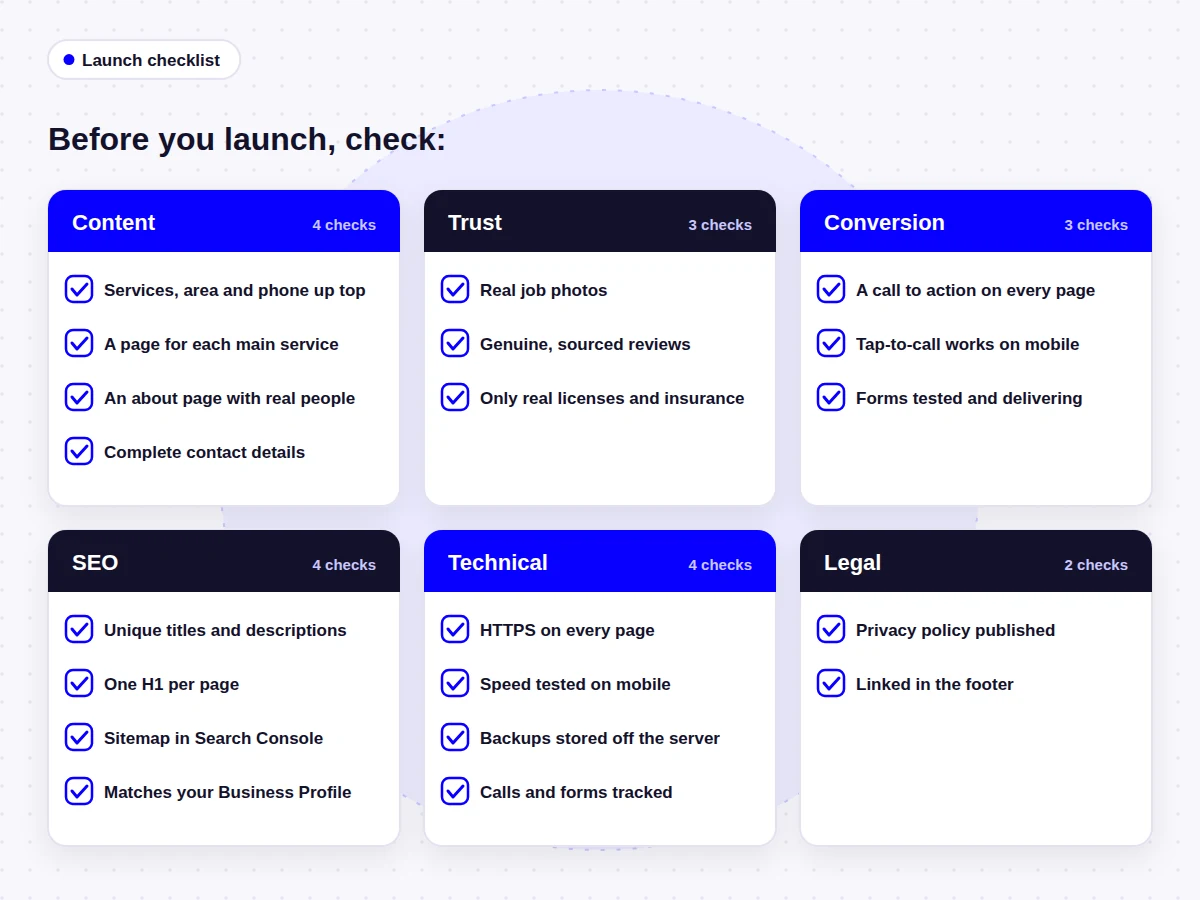
Use this checklist before you launch a new website, or to review the one you have now.
Content
- Homepage states your services, area and phone number on the first screen
- Each main service has its own useful page
- About page shows the real people and credentials behind the business
- Contact page includes phone, form, email, hours and area or address
Trust
- Real job photos instead of stock images
- Genuine reviews, linked to their source where possible
- Licenses, insurance and warranties shown only where they are real
Conversion
- A clear call to action on every page
- Tap-to-call works on mobile
- Forms have been tested and the messages arrive
SEO
- Unique title and meta description on every page
- One H1 per page and logical headings
- XML sitemap submitted in Google Search Console
- Business details match your Google Business Profile
Technical
- HTTPS on every page
- Pages tested for speed on a mobile connection
- Backups scheduled and stored off the server
- Analytics tracking calls and form submissions
Legal
- Privacy policy published
- Privacy policy linked in the footer of every page
Frequently Asked Questions
There is no fixed number. Count one homepage, one page for each main service, an about page, a contact page and a privacy policy, then add a service areas page if you travel to customers. Many service businesses end up with 10 to 15 pages. Add more only when customers need the information.
The homepage, the individual service pages and the contact page. The homepage directs visitors, the service pages answer their questions, and the contact page turns interest into an inquiry. The about page is close behind, especially for businesses that work in customers' homes.
Every main service you want to be hired for should have its own page, as long as you can write something useful about it. Small related tasks can be grouped on one page. Separate pages let you answer specific questions and give each service a better chance of appearing in search.
Not at launch. A blog helps when you can publish genuinely useful answers to customer questions on a regular basis. If you cannot keep it up, a good FAQ section on each service page is a better starting point than a blog that stops after two posts.
It needs the SEO basics from the start: clear page titles, descriptions, headings, internal links, a sitemap and a fast, mobile-friendly build. These are much cheaper to get right during the build than to fix later. Ongoing SEO work is a separate decision based on your goals and competition.
A tappable phone number, a short form, your email address, opening hours, your address or service area, and what happens after someone gets in touch. Ask only for the information you need to reply.
WordPress core, plugins and themes should be updated regularly, and backups should run on a schedule. Content should be reviewed whenever your services, prices, areas or contact details change, and it is worth adding new project photos and reviews as you get them.
If your website collects personal information through forms, analytics or cookies, you should have a privacy policy that explains what you collect and why. The exact legal requirements depend on where you and your customers are, so check the rules that apply to your business.
Start With the Pages Your Customers Need
A good small business website does not need to be large or complicated. It needs to explain what you do and where, prove that you do it well, and make it easy to get in touch, on a phone as much as on a desktop. Get the essential pages right first: homepage, service pages, about, contact and service area. Then build out the technical basics underneath and add optional features only when they solve a real problem for your customers.
If you are starting from nothing, my WordPress website design service follows this same plan. If your current site already has most of this but is slow or hard to manage, a website redesign may be a better route than starting from scratch.
- About the author
Arslan Kalwar is a WordPress website designer and SEO specialist. He has worked with WordPress for more than eight years, completed over 1,200 projects, and contributed to WordPress core. Most of his work is for contractors, trades and other service businesses. More about Arslan.
Need Help Planning Your Business Website?
I plan and build WordPress websites around a business’s services, customers, service areas and goals, then set up the SEO basics as part of the build. If you would like a second opinion on what your site needs, send me a short description of your business.