Home / What Are Service Area Pages?
- Local SEO basics
What Are Service Area Pages and Do You Need Them?
Learn what service area pages are, how they differ from service and location pages, which businesses benefit from them, and when creating too many can hurt your SEO.
- By Arslan Kalwar
- October 11, 2026
- 11 min read
- Quick answer
The short answer
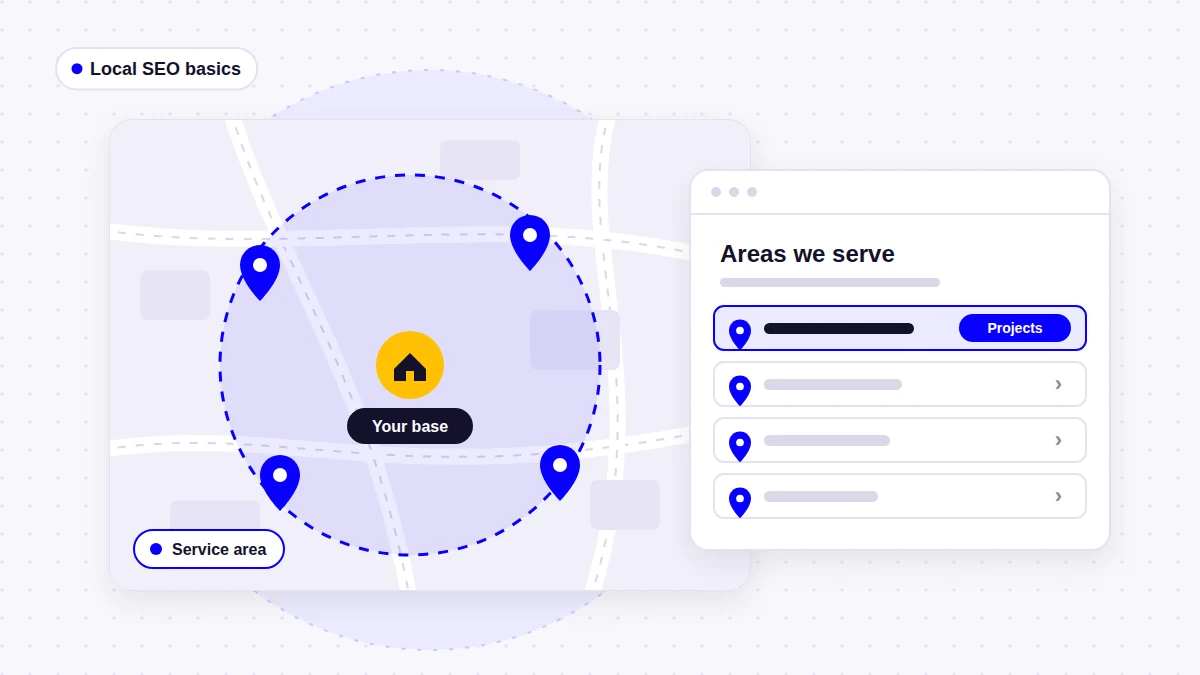
A service area page is a page on your website that explains where your business works when you travel to customers rather than having customers come to you. It can be a single page listing every area you cover, or a page for one specific town, county or region.
- You probably need one: a single service areas page, if you travel to customers across more than one town
- You may need individual area pages: if you cover several distinct areas and have real work, photos, reviews or local details to show for each one
- You probably do not need them: if you serve one town, if customers come to your premises, or if you have nothing different to say about each area
- They can hurt: when they are near-identical pages with only the town name changed, which Google treats as doorway abuse
What Is a Service Area Page?
A service area page tells visitors, and search engines, which places your business serves. Many local businesses travel to customers rather than operate a shopfront in every town they cover. For example, a roofer based in one town may replace roofs across fifteen nearby communities. A pest control company may cover an entire city from one depot. Customers in those other places still need to know, quickly, whether you will come to them.
In practice, the term is used for two different things:
- A service areas page (the hub). One page that lists all the towns, counties or regions you cover, usually with a map or grouped list, and links to anything more detailed. Almost every business that travels to customers benefits from this page.
- An individual service area page. A page about one area, such as “Roof Repair and Replacement in Lake County”. These are optional, and they are only worth creating when there is something specific and useful to say about that area.
Most of the confusion, and most of the SEO risk, comes from the second type. A hub page is hard to get wrong. Twenty individual area pages are very easy to get wrong.
Service Area Pages vs Location Pages vs Service Pages
There is no official definition of these terms. Google does not publish one, and SEO agencies use them differently. Some call any page with a town name in it a “location page”. Others reserve that name for a physical branch with an address. The table below shows how I use the terms, and how they usually overlap.
| Page type | Main purpose | Question it answers | Example |
|---|---|---|---|
| Homepage | Introduces the business and routes visitors | “Is this the right kind of company?” | / |
| Service page | Explains one service in depth, wherever it is delivered | “Do they do what I need, and how?” | /roof-repair/ |
| Service areas page (hub) | Lists every area the business covers | “Do they work where I am?” | /service-areas/ |
| Service area page | Shows the business’s work and relevance in one area it travels to | “Have they worked near me, and what do they know about my area?” | /service-areas/county-name/ |
| Service + area page | One service in one area, where demand and details really differ | “Who does this specific job in my town?” | /roof-repair-town-name/ |
| Location page | Describes a physical branch or office that customers can visit | “Where is the office, and when is it open?” | /locations/branch-name/ |
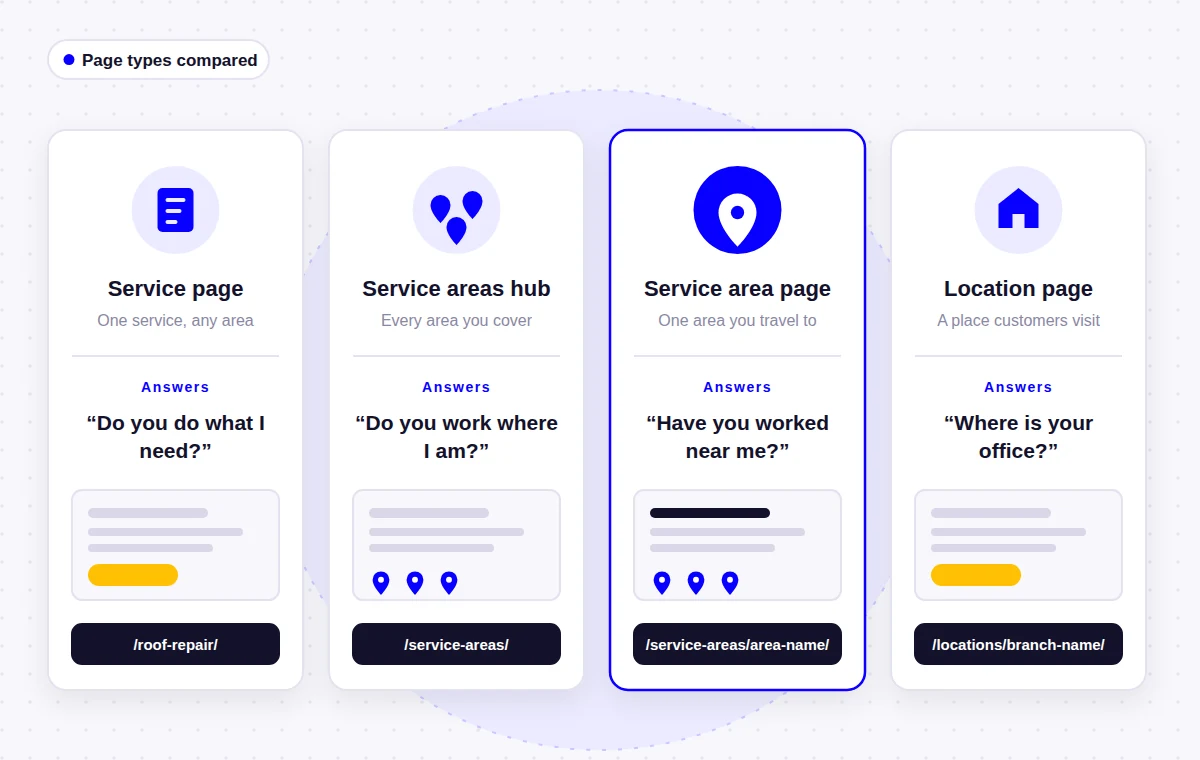
Terms like city page and local landing page are usually other names for a service area page or a service + area page. What matters is not the label but whether the page has a clear job that no other page on your site already does.
How this relates to your Google Business Profile service area
Your Google Business Profile has its own service area setting, and it is not a web page. Google’s Business Profile guidelines say service-area businesses should have one profile for their central office or location with a designated service area, should hide the address if customers do not visit it, and that the overall service area should not extend farther than about two hours of driving time from where the business is based (larger areas can be appropriate for some businesses).
Your website should tell the same story as your profile. If the profile says you cover three counties, your service areas page should list those three counties, not fifty towns you have never worked in.
What a Service Area Page Should Do for a Visitor
A useful service area page does a few specific jobs. If it does none of them, it is probably there only for search engines.
- Confirm coverage quickly. The visitor should see within seconds that you work in their town, and which services are available there.
- Prove local experience. Real projects, photos and reviews from that area show that the coverage claim is true.
- Explain anything that changes locally. Different response times, building types, regulations, access issues or seasonal problems, but only where they genuinely exist.
- Lead to the next step. A clear phone number and quote or booking form, plus links to the detailed service pages.
Do You Need Service Area Pages?
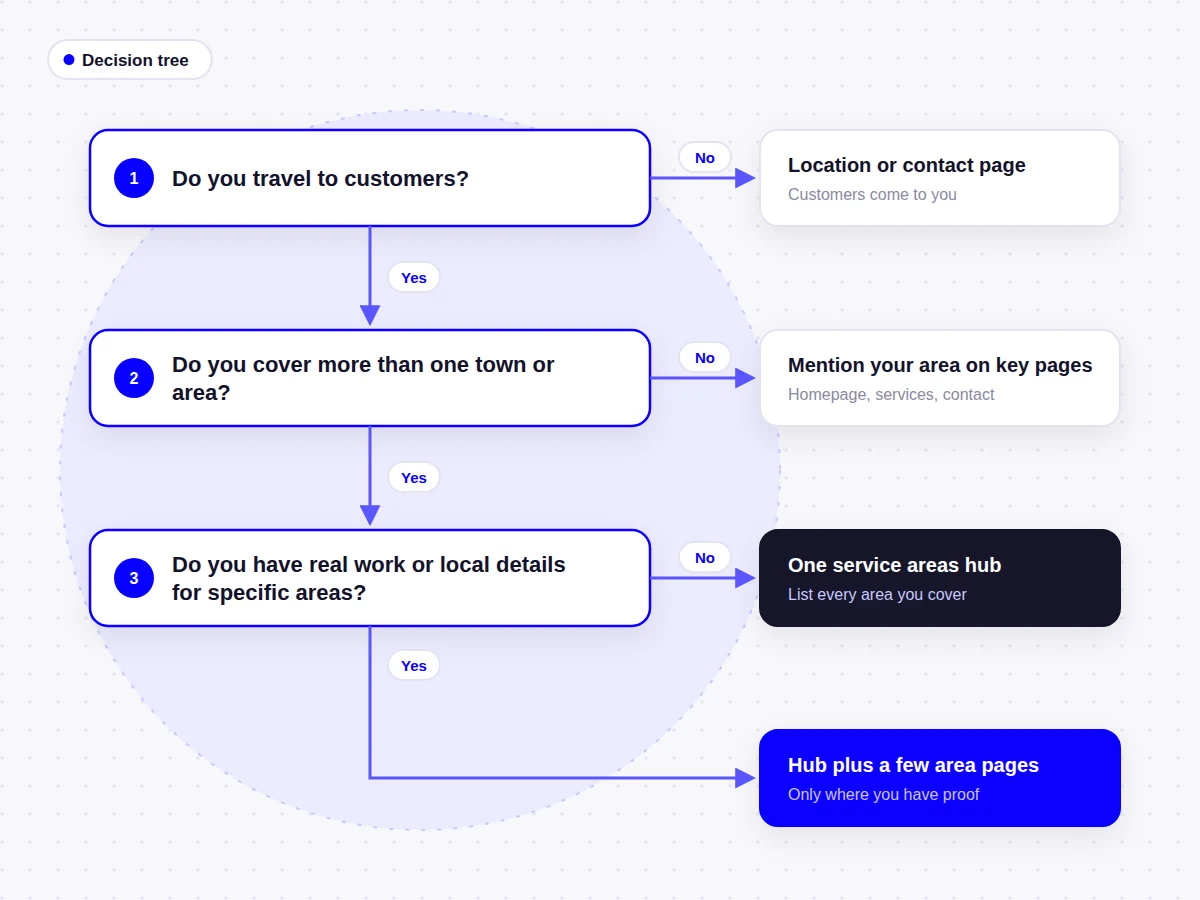
Not every business does. The questions below are the ones I ask when planning the structure of a new service business website.
| Question | If yes | If no |
|---|---|---|
| Do you travel to customers rather than have them visit you? | A service areas page is worth having | You probably need a location or contact page instead |
| Do you cover more than one town, county or region? | List them on a service areas page | Mention your town on the homepage and contact page; that is often enough |
| Do you have completed jobs, photos or reviews from specific areas? | Those areas may justify their own pages | Start with the hub page and add area pages later |
| Does anything really differ between areas (services, regulations, response time, property types)? | Individual pages can explain those differences | Separate pages would repeat the same content |
| Do customers search for your service with a place name? | Area pages can match that search intent | Focus on strong service pages first |
| Would the page still make sense to a customer who never arrived from Google? | It is probably a genuine page | It is probably a doorway page |
Businesses that usually benefit
- Trades that cover a wide area, such as roofing, plumbing, HVAC, electrical and pest control companies
- Businesses that cover several distinct markets, such as two counties with different housing stock or rules
- Companies with crews or vans based in more than one place
- Specialist contractors whose customers expect evidence of nearby work before inviting a quote
Businesses that usually do not need individual area pages
- A business that serves one town or a small radius around it
- A business where customers come to the premises, such as a clinic or salon (a location page fits better)
- A business that works nationally or online, where location is not part of the decision
- Any business that would have to invent local details to fill the pages
When Service Area Pages Can Hurt Your SEO
The biggest risk is the classic “city page” strategy: one template copied dozens or hundreds of times with only the town name changed. Google’s spam policies describe doorway abuse as sites or pages created to rank for specific, similar search queries, and list “having multiple domain names or pages targeted at specific regions or cities that funnel users to one page” as an example. The same policies address scaled content abuse. This can happen when many pages are created mainly to manipulate rankings instead of helping users.
Duplicate wording on its own is not automatically a spam problem. Google’s canonicalization documentation says some duplicate content on a site is normal and not a violation. When several pages are almost the same, Google tends to choose one and ignore the rest. So the realistic outcomes of copy-and-paste area pages range from “most of them are never shown” to “the site is treated as spam”. Neither is a good use of your budget.
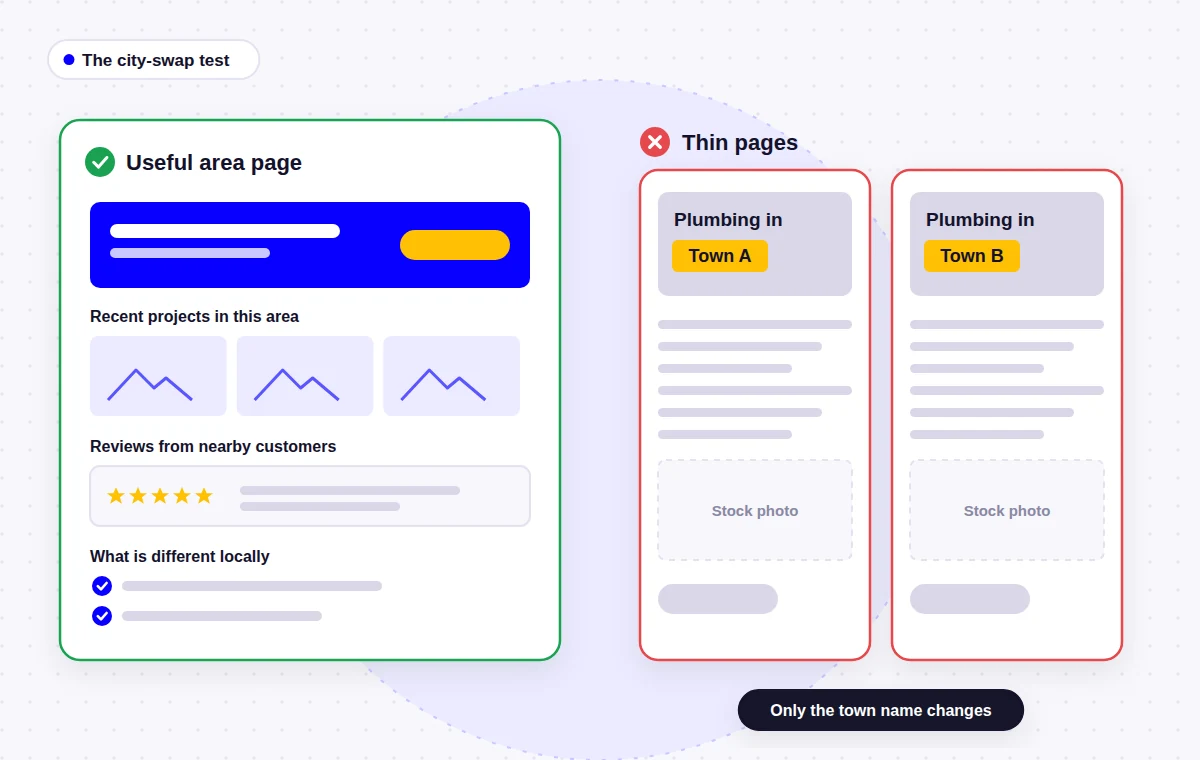
The city-swap test
Cover up the town name on a service area page. If the page would be equally true for every other town you serve, it is not really about that town. Either add genuinely local information or fold it back into your main service areas page.
What Separates a Useful Area Page From a Thin One
| Useful service area page | Thin or doorway-style page |
|---|---|
| Shows jobs completed in that area, with real photos | Uses the same stock photos as every other area page |
| Includes reviews from customers in or near that area | Repeats the same three reviews on every page |
| Explains anything that actually differs locally | Pads the page with generic facts about the town |
| Lists the services available in that area and links to them | Lists every service with the town name added to each |
| Has a phone number and form that work for that area | Funnels every visitor to the same generic contact page |
| Is linked from the service areas page and relevant projects | Is only reachable through the XML sitemap |
If you have decided that individual pages make sense for your business, my guide on how to create service area pages that help local SEO walks through planning, writing and linking them step by step.
How Many Service Area Pages Should You Have?
There is no correct number, and no reliable study proves one. Some local SEO practitioners recommend keeping city pages to a small number, often around 10 to 15. However, this is a rule of thumb, not a Google guideline. In my own planning I work it out like this:
- Start with one service areas page that lists everywhere you genuinely work.
- Add an individual page only for areas where you have real work to show, a meaningful share of your jobs, or something specific to explain.
- Group small neighboring towns on one page (for example by county or district) rather than giving each its own thin page.
- Add more pages over time as you complete work in new areas, not all at once on launch day.
For many small service businesses, that means one hub page and somewhere between zero and a handful of area pages. That is a perfectly good result.
Examples From Real Service Business Websites
Here is how service areas have been handled on a few websites I have built. These examples describe structure only; I am not claiming any ranking or traffic results for them.
- One county, woven through the site. On the Goodman Roofing website, the business serves Kankakee County, Illinois. Rather than a page for every small town, the county is referenced throughout the page titles, headings and copy, so local visitors recognize a nearby roofer straight away.
- Named towns inside service content. The WindowLab website lists towns across Nassau and Suffolk County, such as Babylon, Islip and Huntington, in service area sections on the site instead of creating a separate page for each town.
- A regional list in the copy. The Maximum Painting and Maintenance website names Gainesville along with Alachua, Marion and Levy counties in its service content, which matches how the business actually works.
- A hub backed by real projects. My own service areas page lists the countries and regions I work in, and every location mentioned is connected to real website projects rather than added as a keyword.
None of these sites needed dozens of city pages. Each one matches the way the business really operates.
What Service Area Pages Can and Cannot Do for Local SEO
Google says local results are based mainly on relevance, distance and prominence, and that a business’s position in web results also plays a part (How to improve your local ranking on Google). Service area pages mainly help with relevance in the regular organic results: a well-made page can show that your business is a sensible answer for a search like “roof repair in Lake County”.
They cannot move your business closer to a searcher. In the map results, distance from the business’s location still matters, so a page about a town 40 minutes away will not, on its own, put your profile in that town’s map pack. That is not a reason to skip area pages, but it is a reason to keep expectations realistic and to put most of the effort into strong on-page SEO and a well-maintained Google Business Profile.
Frequently Asked Questions
A service area page is a web page that shows where a business works when it travels to customers. It can be a single page listing all areas served, or a page dedicated to one town, county or region with local projects, reviews and details.
The terms overlap and are used differently by different people. Location page usually means a page for a physical office or branch that customers can visit. Service area page usually means a page for an area the business travels to without having an office there.
Useful ones can be. A page with genuine local work, reviews and information can help you appear for searches that include a place name. Pages created only to target town names, with the same content on each, are unlikely to help and can break Google's spam policies.
Yes, when they are near-identical pages with only the town name changed. Google describes pages targeted at specific regions or cities that funnel users to one page as doorway abuse. Large sets of low-value pages can also fall under its scaled content abuse policy.
Usually not. List every area you cover on one service areas page, then create individual pages only for areas where you have real work to show or something specific to explain. Small neighboring towns can often share one page.
Yes. Google's guidelines tell service-area businesses to hide their address and set a service area instead. Your website pages can also appear in organic results for nearby towns. Map results still take distance into account, though, so areas far from your base are harder to show up in.
Usually not. Mention your town clearly on the homepage, service pages and contact page, and make sure it matches your Google Business Profile. A separate page adds little if there is only one area to describe.
The Bottom Line
Service area pages are useful when they answer a real customer question: “Do you work here, and have you done this kind of job near me?” Most businesses that travel to customers should have one clear service areas page. Fewer need individual area pages, and those pages are only worth building when you have real local work, proof or information to put on them.
If you want to go further, the follow-up guide covers how to create service area pages step by step. If you are planning a new site from scratch, my WordPress website design process includes deciding which service and area pages your business actually needs.
- About the author
Arslan Kalwar is a WordPress website designer and SEO specialist. He has worked with WordPress for more than eight years, completed over 1,200 projects, and contributed to WordPress core. Most of his work is for contractors, trades and other service businesses, including planning how their services and service areas are structured. More about Arslan.
Need Help Planning Your Local Business Website?
I plan and build WordPress websites for service businesses, with clear service pages, honest service area structures, on-page SEO and simple ways for customers to get in touch. Tell me where you work and what you offer, and I will suggest a sensible page structure.