- Roofing website guide
What Should a Roofing Company Website Include?
A practical guide to what a roofing company website needs: separate service pages for repair, replacement, inspections and storm damage, clear quote paths, service areas, project proof, trust signals and fast mobile calls.
- By Arslan Kalwar
- October 29, 2026
- 17 min read
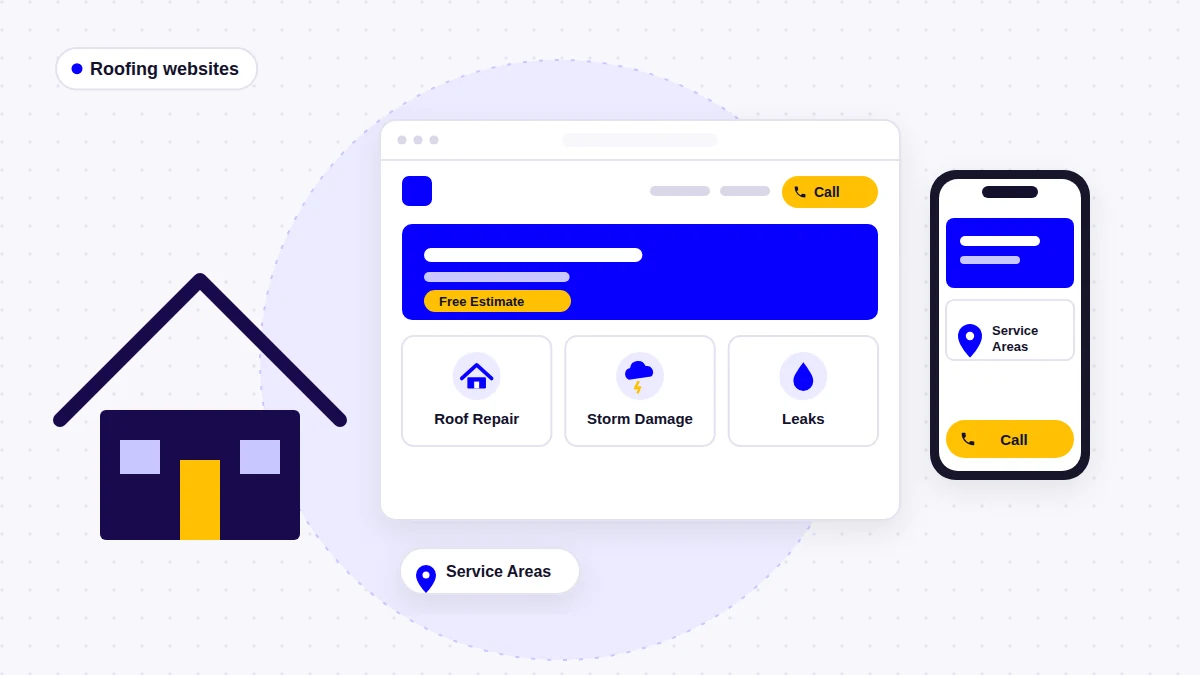
Most roofing websites I am asked to rebuild look fine. There is a big roof photo, a logo and a phone number. The problem is what happens next: a homeowner with water in the attic, a homeowner planning a new roof and a property manager with a flat roof all land on the same page and get the same paragraph. A roofing company website has to do more work than that.
- Quick answer
A roofing company website should help each type of roofing customer find their situation, trust the company and ask for help in one or two taps. It should include:
- Separate pages for roof repair, roof replacement, roof inspections and storm damage
- A clear emergency path with a tap-to-call number, if you take urgent calls
- A free estimate or inspection request that is visible on every page
- A service areas page, plus area pages only where you have real local content
- A project gallery with real photos, organized by roof type or job
- Genuine reviews, license and insurance details, and warranties you actually offer
- Insurance claim and financing information only if the company genuinely provides it
- A fast, mobile-friendly build with local SEO basics and a Google Business Profile that matches the site
A Roofing Website Is Not a Website With a Roof Photo
Roofing is a high-cost, high-trust purchase, and it often starts under pressure. That changes what the website has to do. A generic small business template answers “who are you?” A roofing website has to answer “can you deal with my roof, here, soon, and can I trust you on it?”
In practice, roofing visitors arrive in a few very different situations. When I plan a roofing site, I map these first, before any design work:
| Visitor situation | What they need first | Best next step |
|---|---|---|
| Active leak or storm damage | Proof you handle this kind of damage, fast | Tap to call, emergency or storm page |
| Planning a replacement | Materials, process, warranties, real projects | Free estimate or inspection request |
| Not sure what is wrong | What an inspection covers and costs | Inspection request |
| Commercial property manager | Commercial experience and roof systems | Commercial quote or call |
| Comparing roofers | Reviews, license, insurance, local presence | Reviews, projects, then estimate |
Everything else in this guide follows from that table. Service structure, quote paths, service areas, project evidence, trust signals, mobile calls and local SEO are how a site serves all five visitors without confusing any of them. If you want the broader trades view first, my guide to what a contractor website should include covers the shared foundations.
The Pages a Roofing Company Website Needs
Here is the page plan I start from. Not every roofer needs every page, but every page on this list exists because a real customer needs it.
| Page | Priority | What it should include |
|---|---|---|
| Homepage | Essential | Main services, area, phone, estimate button, proof |
| Roof repair | Essential | Common problems, process, response time, call option |
| Roof replacement | Essential | Materials, process, warranty, projects, estimate |
| Roof inspection | Essential if offered | What is checked, what you receive, how to book |
| Storm damage | Essential in storm markets | What happens after a call, documentation, next steps |
| Commercial roofing | If you do commercial work | Roof systems, property types, commercial contact |
| Material or specialty pages | If they matter to you | Metal, slate, flat roofs, skylights, gutters |
| Service areas | Essential | Towns and counties served, links to area pages |
| Projects or gallery | Essential | Real photos, roof type, job notes |
| Reviews | Recommended | Genuine reviews, linked to their source |
| About | Essential | Owner, team, license, insurance, history |
| Contact or free estimate | Essential | Phone, short form, hours, what happens next |
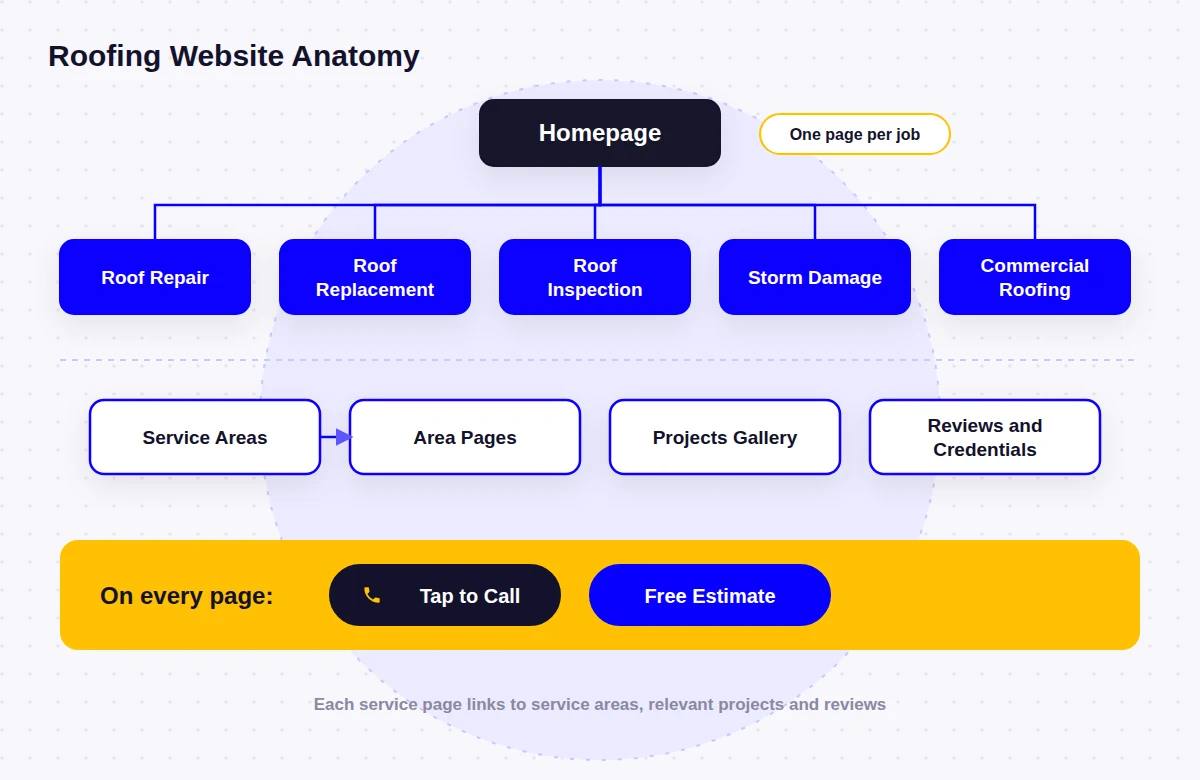
For a roofer with five core services and one county, that is usually 12 to 20 pages. The number matters less than the rule behind it: one clear page for each job you want to be hired for, and one clear way to ask for help on every page.
What the Homepage Should Do
The homepage of a roofing website works like a dispatcher. It does not need to explain everything. It needs to send each visitor to the right page quickly. On the first screen, I want to see:
- A specific headline that names the work and the area, such as “Roof Repair and Replacement in [County]”
- A tappable phone number and one primary button, such as “Get a Free Estimate” or “Book an Inspection”
- Clear routes to repair, replacement, storm damage and, if relevant, commercial roofing
- Early proof: a few genuine reviews, real roof photos and the credentials that apply to you
Further down: a short service area summary, a simple “how it works” section from call to finished roof, recent projects and a second call to action. On the Goodman Roofing website, for example, the homepage asks visitors to choose between home roofing and commercial roofing, because those two audiences ask different questions. On the Great Roof website, the homepage leads with the free roof inspection and estimate, so the first decision a homeowner makes is a simple one.
Roofing Service Pages: Repair, Replacement, Inspection and Storm Damage
The most common structural mistake on roofing websites is a single “Services” page with a short paragraph for each service. Repair, replacement and storm work are different searches, different buyers and different conversations. Each one deserves its own page that answers its own questions.
Roof repair
Repair visitors want to know whether you fix their kind of problem and how fast you can come out. A good roof repair page names the common problems (leaks, missing or lifted shingles, flashing, damaged vents or chimney areas), explains what happens on the first visit, says how quickly you typically respond if you can keep that promise, and keeps the phone number in easy reach.
Roof replacement
Replacement is a planned, expensive decision, so this page can be longer. Cover the materials you install, signs that a roof needs replacing rather than repair, the replacement process from tear-off to cleanup, what your warranty covers in plain terms, and photos of finished replacements. Pricing factors help even if you do not publish prices: roof size, pitch, material, layers to remove and access all change the cost.
Roof inspection
If you offer inspections, give them a page. Explain what you check, whether you go on the roof or use photos or drones, what the homeowner receives afterward, and whether the inspection is free. An inspection page is often the easiest first step for a homeowner who does not yet know what is wrong.
Storm damage
Storm damage visitors are anxious and often unsure what to do first. The page should say which kinds of damage you handle (wind, hail, fallen trees, water), what happens after they call, how you document damage, and what temporary protection you can provide. The Elite Roof Restoration website is a good example: water, wind and tree damage restoration pages outline what happens after a call, which sets expectations before the crew arrives. Calm and specific works better here than urgent sales language.
Emergency roofing
Only advertise emergency service if someone actually answers. If you do take urgent calls, make that obvious: a tap-to-call button that stays visible on mobile, your real availability (for example evenings, weekends or around the clock) and a short explanation of emergency tarping or temporary repairs. On the Great Roof site, a tap-to-call number repeats through the site to match the company’s round-the-clock availability for urgent calls, alongside separate explanations of storm damage repair, emergency roofing and leak repair.
Residential, commercial and specialty services
If you do commercial work, a dedicated commercial page saves property managers from reading homeowner content. The Starhawk Roofing website gives each of its nine services its own page, leads the navigation with roof replacement, repair and installation, and groups gutters, siding, soffit, fascia and framing as supporting exterior services underneath. Specialist work needs its own space too: the Romano Roofing website separates asphalt shingles, flat roofs, slate, gutters and skylights in the menu, so a visitor with a leaking skylight lands on the right page straight away.
Separate pages only help when each one has something specific to say. Five pages with the same paragraph and a different heading do not help visitors or search engines. If you cannot write a useful page about a service yet, keep it on a broader page until you can.
Insurance Claim Information: Only If You Genuinely Help
Many roofing customers arrive after a storm with one question: “Will my insurance cover this?” If your company genuinely helps homeowners through the claim process, explaining that on the website is useful. Great Roof, for example, has its own explanation of insurance claims assistance, written for homeowners who are unsure whether they need a repair, a replacement or help with a claim.
But this is an area where website copy needs care. Describe only what you actually do, such as inspecting and photographing damage, providing documentation and estimates, or meeting the adjuster if that is your practice. Avoid promising outcomes, coverage or settlement amounts, and do not present the page as insurance or legal advice.
Some states restrict what roofers can say and do around claims. Texas, for example, does not allow a roofer or contractor to act as a public insurance adjuster or to advertise that they would, and says contractors cannot offer to waive or absorb a deductible (Texas Department of Insurance). Check the rules in your state before publishing claim-related copy, and have anything you are unsure about reviewed by someone qualified.
Quote, Estimate and Inspection Calls to Action
Every roofing page should end with a clear next step, and the main one should be visible without scrolling. Pick a primary offer that matches how you actually sell: a free estimate, a free inspection or an appointment. Then repeat it consistently.
- Elite Roof Restoration: a Get a Free Estimate button sits beside a click-to-call phone number, so urgent callers and planners each get the option that suits them.
- Starhawk Roofing: Book An Appointment and Get Free Estimate buttons appear in the header and at the end of each service, next to the phone number.
- Romano Roofing: a Schedule Free Estimate button and contact form appear throughout the site as a low-pressure first step.
Keep the estimate form short. Name, phone, address or town, the type of help needed (repair, replacement, inspection, storm damage) and an optional message is usually enough to call someone back. The Goodman Roofing quote form asks only for the essentials, with the phone number visible in the header. A photo upload field can help repair inquiries, but make it optional.
Mobile Calls and Contact Forms
A homeowner looking at a leak is usually holding a phone. Google also uses the mobile version of a site for indexing and ranking (mobile-first indexing), so the phone version is the real website, not a smaller copy of it. On mobile, I check that:
- The phone number is a tap-to-call link and stays visible, for example in a sticky header or bottom bar
- The primary estimate button is reachable with a thumb on every page
- Forms have visible labels, the right keyboard for phone and email fields, and no puzzle-style spam checks
- Gallery images are compressed so pages load quickly on a weak signal
- Pages meet Google’s Core Web Vitals targets: LCP within 2.5 seconds, INP under 200 milliseconds and CLS under 0.1 (web.dev)
The contact page itself should list the phone number first, then the short form, your email, your hours, whether you take emergency calls and what happens after someone submits the form. Only promise a response time you can keep.
Project Galleries and Proof of Work
Roofing work is easy to photograph and hard to judge from words alone, so real project photos do a lot of work. Stock photos of perfect roofs do the opposite: they make a local roofer look like every other roofer.
- Organize projects by roof type or job (shingle replacement, metal, flat roof, storm repair) so visitors find work like theirs
- Use before-and-after pairs from similar angles where you have them
- Add a short note to each project: the problem, what was done, the material and the town, with the owner’s permission
- Show projects on the relevant service pages, not only in a separate gallery
- Include photos of your crew, trucks and equipment, which show that the company is real
Even good phone photos taken on site are better than polished stock images. If you are short on photos, start taking before, during and after shots on every job now.
Reviews and Trust Signals for Roofers
After a storm, homeowners are warned to be careful. The FTC advises people to confirm a contractor’s license and insurance, check online reviews and get more than one estimate (FTC consumer advice). A roofing website should make those checks easy instead of making visitors hunt for them.
| Trust signal | How to show it |
|---|---|
| License | License type and number where your state issues one |
| Insurance | The coverage you carry, stated plainly |
| Reviews | Genuine reviews, linked to Google or the original source |
| Warranties | What is covered and for how long, matching your written terms |
| Manufacturer certifications | Only current certifications you actually hold |
| Real people | Owner and crew photos, names, short bios |
| Local presence | Where you are based and the areas you serve |
The Great Roof site, for example, shows the company’s Alabama home builder license and warranty-backed work. The Starhawk site puts its quality work guarantee, on-time delivery, financing options and military discounts early on the page, because those are practical reasons to choose the company.
When you list insurance, be specific about what you carry. The USA Roofing Insurance website, which I built for an insurer that serves roofing contractors, explains coverage types such as general liability, workers’ compensation and commercial auto, which is a useful reminder that “fully insured” means more to a homeowner when it is spelled out.
Reviews must be real. The FTC’s rule on reviews and testimonials, announced in August 2024, prohibits fake reviews, buying positive reviews and suppressing negative ones (FTC announcement). Show genuine reviews, link to where they came from and reply to them on your Google Business Profile.
Financing: When It Belongs on the Site
A roof replacement is a large bill, so if you genuinely offer financing, mention it on the replacement page, near the estimate button and in the FAQ. Starhawk is a good example of showing financing early as one of several reasons to choose the company.
If you do not offer financing, leave it out. If you do, use the wording your financing provider approves, name the provider if they allow it, and avoid claims such as “everyone qualifies” or “0% for everyone” unless they are true for every customer.
Service Areas and Local SEO for Roofing Companies
Roofing is local. Google says local results are mainly based on relevance, distance and prominence (how Google ranks local results). Distance from the searcher is outside your control, but relevance and prominence are partly in your hands, and the website plays a big part in both.
A service areas page and area pages with real content
Every roofing website should have a service areas page that lists the towns and counties you actually serve. Individual area pages help when you have something specific to say about each place: local projects, reviews from that area, local roofing conditions and how you serve it. The roofing sites I have built show different ways to do this:
- Great Roof has dedicated pages for Phenix City, Auburn, Opelika, Smiths Station and Columbus, across two states, without stretching into towns it does not serve.
- Ridge Roofing & Exteriors uses the homepage as a hub for Pawleys Island, with separate location pages such as Carolina Forest branching off it as more coastal communities are added.
- Elite Roof Restoration names Stamford, Greenwich, Norwalk, Darien, New Canaan and Westport in town-by-town service content written to work alongside its Google Business Profile.
- Goodman Roofing keeps one county focus, with Kankakee and Kankakee County running through page titles, headings and copy.
What to avoid is a stack of near-identical city pages with only the town name swapped. Google lists “pages targeted at specific regions or cities that funnel users to one page” as an example of doorway abuse (Google spam policies). I explain the difference in what service area pages are and when you need them, and how to plan them in how many service area pages a business should have.
Keep the site and Google Business Profile consistent
Your website and Google Business Profile should tell the same story: the same business name, phone number, services and service area. Google’s guidelines say service-area businesses should hide their address if customers do not visit it, and that the overall service area should not extend farther than about two hours of driving time from the business base (Business Profile guidelines).
On-page basics and structured data
- A unique page title and description for each service and area page
- Headings that use the words customers search for, such as “roof repair in [town]”, written naturally
- Internal links from service pages to related services, projects and areas
- LocalBusiness structured data (Google documentation), using the RoofingContractor type where it fits
- A short FAQ on key pages, and a blog only if you will answer real homeowner questions
Ridge Roofing’s blog is a good use of that last point: roofing tips and guides answer common homeowner questions and support the main service pages. Be wary of anyone who guarantees rankings. Google itself says no one can guarantee a #1 ranking (Do you need an SEO?).
How Real Roofing Websites Put This Together
Each of these roofing websites started from a different business situation, which is why they ended up with different structures. These notes come from the case studies themselves.
| Roofing company | Situation | Main structural decision |
|---|---|---|
| Goodman Roofing (Kankakee, IL) | Homeowners and commercial buildings | Residential and commercial split from the homepage |
| Great Roof (Phenix City, AL) | Residential only, two states | Inspection-first layout and five area pages |
| Elite Roof Restoration (Stamford, CT) | Customers often call after damage | Restoration pages and estimate beside click-to-call |
| Romano Roofing (Bensalem, PA) | Several roof systems and skylights | Menu built around roof types and skylight pages |
| Starhawk Roofing (The Woodlands, TX) | Roofing plus exterior services | Nine service pages, roofing first in navigation |
| Ridge Roofing (Pawleys Island, SC) | Several coastal communities | Hub and location pages plus a tips blog |
None of these sites is a template with a new logo. The structure came from the services, customers and areas of each business, which is the part of a roofing website that matters most.
Common Roofing Website Mistakes
| Mistake | Why it costs calls | Better approach |
|---|---|---|
| One “Services” page for everything | No service gets a proper answer or ranks well | A page for each main service |
| Phone number not tappable on mobile | Urgent callers give up or call someone else | Tap-to-call, always visible |
| Stock roof photos only | Nothing proves the quality of your work | Real project photos by roof type |
| Copy-paste city pages | Thin pages, and a doorway risk | Fewer area pages with real local detail |
| Vague “licensed and insured” | Visitors cannot verify it | License number and coverage stated plainly |
| Claim, financing or 24/7 promises you cannot keep | Misleads customers, may break state rules | Describe only what you actually offer |
| Long estimate forms | Fewer people finish them | Five or six short fields |
| Profile and website disagree | Mixed signals to customers and Google | Same name, phone, services and areas |
Roofing Website Checklist
- Separate repair, replacement and inspection pages
- Storm damage page if you do storm work
- Commercial page if you do commercial work
- Service areas page and useful area pages
- Tap-to-call number visible on mobile
- Free estimate or inspection button on every page
- Short estimate form with clear labels
- Emergency path only if someone answers
- Real project photos organized by job type
- Genuine reviews linked to their source
- License, insurance and warranty details
- Claims help and financing only if offered
- Unique titles and headings per page
- Business Profile matches the website
- LocalBusiness structured data
- Fast pages that pass Core Web Vitals
Frequently Asked Questions
What should a roofing company website include?
At minimum: a clear homepage, separate pages for roof repair, replacement and inspections, a storm damage page if you do storm work, a service areas page, a project gallery, genuine reviews, license and insurance details, and a contact page with a tap-to-call number and a short estimate form. Add commercial, material and area pages where they match your business.
How many pages should a roofing website have?
There is no fixed number. A roofer with five core services and one county often ends up with 12 to 20 pages. Add a page when a customer needs it, such as a new service or an area where you have real local work, not to make the site look bigger.
Should a roofing website have a storm damage page?
Yes, if you handle storm damage. Storm visitors have different questions from replacement shoppers: what happens after they call, how damage is documented and what temporary protection is possible. A dedicated page answers those questions and gives that search its own page.
Can a roofing website mention insurance claims?
It can describe the help you genuinely provide, such as inspections, photos and documentation. It should not promise coverage or outcomes, and some states restrict what roofers can advertise. Texas, for example, does not allow roofers to act as or advertise as public adjusters, so check your state’s rules first.
Do roofers need service area pages?
Every roofer needs a service areas page. Individual area pages help when each one has real local content, such as local projects and reviews. Near-identical pages with only the town name changed can count as doorway pages under Google’s spam policies.
What is the most important part of a roofing website?
The path from a visitor’s situation to a phone call or estimate request. That depends on clear service pages, a visible tap-to-call number on mobile, real proof of work and trust details people can verify.
How much does a roofing company website cost?
It depends on the number of pages, who writes the content, the SEO work included and ongoing support. I explain the main cost factors and published estimates in how much a WordPress website costs for a small business.
Build the Structure Before the Design
A good roofing company website starts with the customers, not the colors: the homeowner with a leak, the one planning a new roof, the property manager and the person comparing three roofers. Give each of them a page, a reason to trust you and an easy way to call or request an estimate. Then make it look good.
If you are planning a new roofing site or fixing one that is not bringing in calls, my roofing website design page explains how I approach these projects.
- About the author
Arslan Kalwar is a WordPress website designer and SEO specialist who builds websites for contractors, roofers, trades and other local service businesses. He has worked with WordPress for more than eight years, has completed 1,200+ projects and is a WordPress Core contributor. More about Arslan.
Planning a Roofing Company Website?
I build WordPress websites for roofing companies with separate service pages, clear estimate paths, service areas and real project proof. See how I plan these projects, or send a short note about your business.