- Contractor website guide
What Should a Contractor Website Include?
A page-by-page guide to what a contractor website needs: services, service areas, project proof, credentials, quote requests and click-to-call, plus the local SEO, mobile and schema details that are easy to get wrong.
- By Arslan Kalwar
- October 22, 2026
- 18 min read
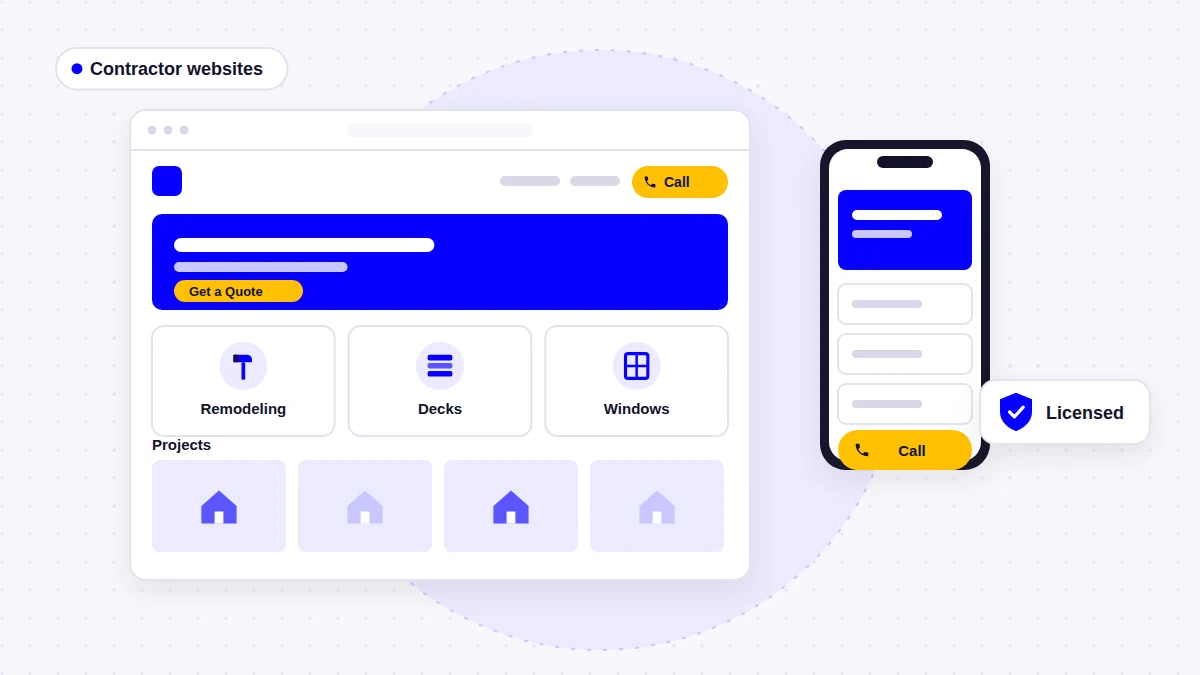
Most of my work is building WordPress websites for contractors: remodelers, deck and basement builders, drywall and framing crews, window installers, garage door companies and home builders. The question I hear most at the start of a project is some version of “what should be on the site?” This guide is my answer, written for contractors planning a new site or checking the one they have.
- Quick answer
A contractor website should show what you build or fix, where you work, proof that you do it well, and an easy way to ask for a quote. In practice that means:
- A homepage that states your main services, your area and your phone number on the first screen
- A separate page for each main service, not one long list
- A clear service area, with area pages only where you have something local to say
- A project portfolio with your own photos, organized by project type
- Genuine reviews, an honest about page, and licenses and insurance where your trade requires them
- A quote request form that asks about the job, plus click-to-call on every page
- Emergency contact and financing details only if you actually offer them
- A fast, mobile-first build with local SEO and accurate schema set up from the start
A Contractor Website Is Not a Construction-Themed Template
If you search for “contractor website”, most of the results are agencies selling design, website builders selling templates and software companies with a blog. That tells you something about the term: people searching it are usually trying to work out what kind of site to get and what it should contain, not which hard-hat theme looks best.
A template with orange accents and a photo of a crane looks like a contractor website. It does not work like one. When I plan a site, I start from the decisions a visitor is trying to make:
- Do you do the job I need? Answered by clear service pages.
- Do you work where I am? Answered by service area information.
- Are you any good, and are you legitimate? Answered by real projects, reviews and credentials.
- What happens if I get in touch? Answered by a visible phone number, a quote form and a short explanation of your process.
Who the visitor is matters as much as the trade. A homeowner comparing remodelers on a phone needs something different from a general contractor looking for a drywall subcontractor. The AR Elite Drywall website, for example, was written for builders, developers and project managers first, with a project inquiry form that invites them to share scope and timelines. A homeowner-facing remodeling site would be planned around estimates instead. I explain how I plan these projects on my contractor website design page.
If you want the general version of this topic, my guide to what a small business website should include covers the basics that apply to every business. This article focuses on what changes when the business is a contractor.
The Pages a Contractor Website Needs
This is the page set I plan for most residential contractors. Smaller businesses can combine some of it; larger ones add more service and project pages.
| Page | Its job | What it must include |
|---|---|---|
| Homepage | Confirm fit in seconds | Main services, area, phone, quote button, proof |
| Services overview | Help visitors pick a service | Short summaries linking to each service page |
| Individual service pages | Answer one job in depth | Scope, process, photos, FAQs, call to action |
| Service areas | Confirm you work there | Towns or counties served, matching your Google profile |
| Projects / portfolio | Prove the quality of work | Your own photos, grouped by project type |
| Reviews | Show what customers say | Genuine, attributed reviews, linked to the source |
| About | Show who will do the work | Owner, team, licenses, insurance, how you work |
| Quote request / contact | Turn interest into an inquiry | Form, phone, email, hours, what happens next |
| Financing (if offered) | Answer “can I afford it?” | Who provides it and how to apply |
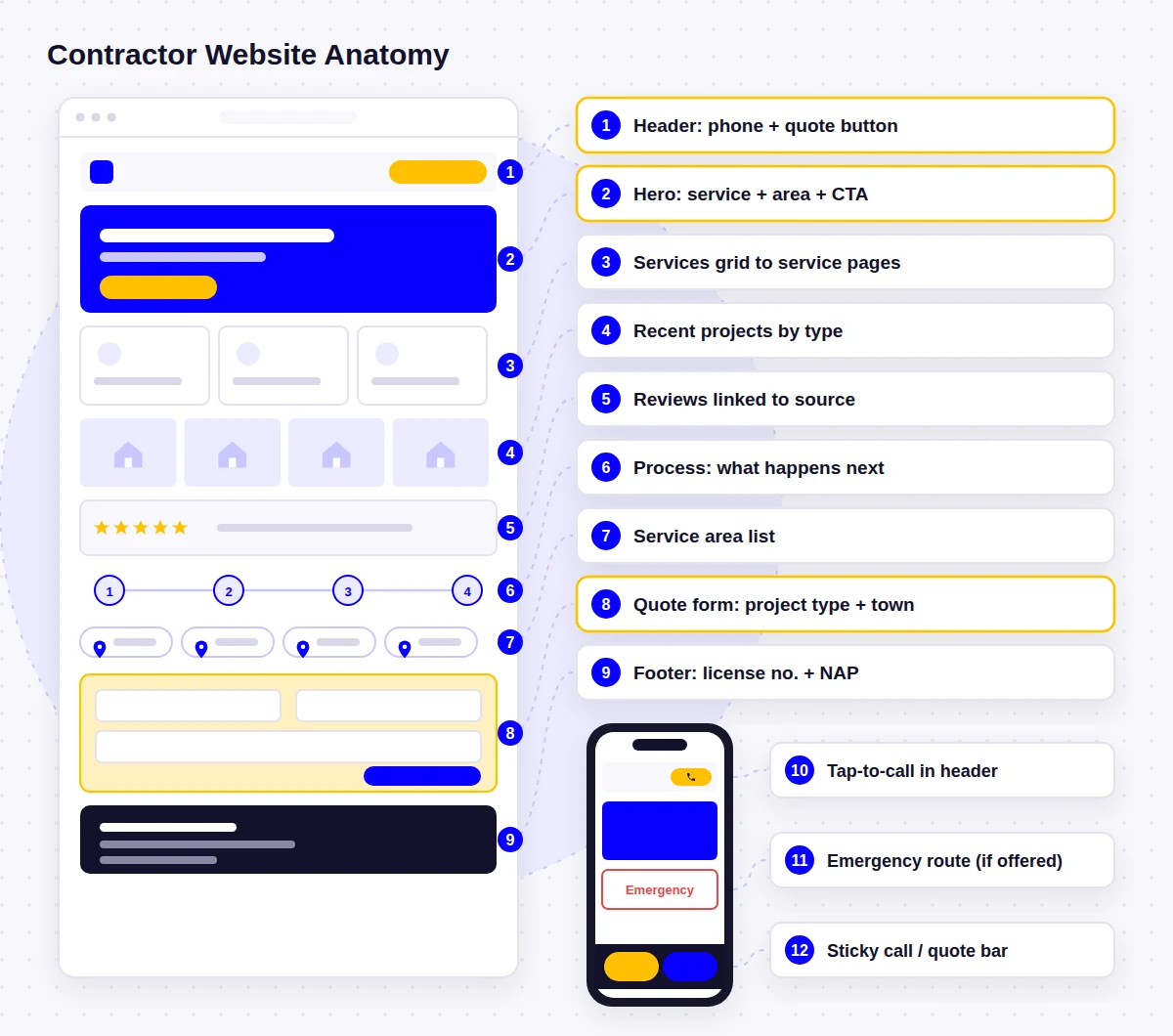
Homepage: Answer the First Questions Without Scrolling
A contractor homepage is a sorting page. Its first job is to tell a visitor they are in the right place, then send them to the right service or straight to a quote. The first screen, especially on a phone, should show:
- A headline that names what you do and where, such as “Kitchen and Bathroom Remodeling in [Your City]”, not a slogan
- A tappable phone number and one main button (“Request an Estimate”)
- One quick proof point you can back up: a review rating linked to its source, a license number or a real project photo
Below that, a simple order works well: services, recent projects, why customers choose you, reviews, service area, and a final call to action. On the GHS Renovations website, the homepage moves from a short introduction to services, then reasons to choose the company, then a contact prompt, so a homeowner scanning on a phone does not lose the thread.
If you offer two very different things, give them equal weight. The Brewland Construction homepage introduces decks and basements as two equal paths, each leading to its own page, so a homeowner planning a deck does not have to read about basement finishing first.
Contractor Services and Individual Service Pages
The most common structural problem I see on contractor sites is a single “Services” page with every job listed in one paragraph. It makes real range look like a lack of focus, and it gives search engines one weak page instead of several clear ones.
When a service deserves its own page
Give a service its own page when customers search for it by name, when it has its own process or price range, or when you want more of that work. Kitchen remodeling and bathroom remodeling are usually separate pages; “trim and caulking” usually is not.
The RiverFront Contractors website gives basement finishing, bathroom remodeling, deck construction and painting their own content, each describing the work, the steps of the process and what homeowners can expect. On the All Garage Doors website, even specific repairs such as drum replacement have their own page, written in everyday terms.
What goes on a contractor service page
- What the service covers and what it does not, in plain language
- Who it is for and the problems that lead people to it
- Your process from first visit to completion, in a few steps
- Photos from your own jobs of that specific service
- Timeline or budget guidance as a range, only if you are comfortable sharing it
- FAQs that answer real questions you get on the phone
- Where you offer it, if that differs from your main area
- A call to action specific to the service, such as “Request a Deck Estimate”
The WindowLab website is a good example of keeping this simple: windows and doors each have a page split into new installations and replacements, with a short How We Work section and FAQs on each service page.
Service Areas
Contractors go to the customer, so where you work matters as much as what you do. At a minimum, list the towns, counties or regions you cover on a service areas page, and mention your main area on the homepage and in the footer. Keep it consistent with your Google Business Profile. Google’s Business Profile guidelines say a service area should generally not extend farther than about two hours of driving time from where the business is based, though larger areas may suit some businesses.
Individual area pages help when you have something genuinely local to say: projects completed there, local conditions or permit differences, or services you only offer in certain places. RiverFront Contractors serves a two-state metro, so it has city landing pages for places such as Lenexa, Overland Park and Parkville, and the navigation separates services from service areas so homeowners can browse either way.
What to avoid is a stack of near-identical pages where only the town name changes. Google’s spam policies describe that pattern as doorway abuse. I explain how to build area pages that are worth having in how to create service area pages that help local SEO.
Project Portfolio: Proof You Did the Work
For most contractors, the portfolio is the most persuasive part of the site. Homeowners want to see work like theirs; builders and developers want to see projects of a similar type and scale. A useful contractor portfolio:
- Uses your own photos, never stock images or photos from manufacturers presented as your work
- Is organized by project type (kitchens, decks, additions), so visitors find relevant work quickly
- Includes before-and-after pairs where the change is the point, as with remodeling
- Gives each featured project a few lines: location, what was done and any challenge solved
- Links each project type to its service page, and each service page back to matching projects
- Is easy for you to update after launch, so new jobs actually get added
On the Complete Living Spaces website, large project images carry each page, with short headings beside them, and the site was built on WordPress so the team can add finished projects as they complete them. That second point matters more than people expect. A gallery that stops being updated a year after launch slowly becomes evidence that the business is less active than it is.
You do not need a professional photographer for every job. Clear, well-lit phone photos of real work are more convincing than polished stock images. Take a few before you start, during the work and after cleanup, from the same angle where you can.
Reviews and Testimonials
Reviews do the most work when they are specific and checkable. Show the reviewer’s first name and town or project type, keep the review text as written, and link to the source, usually your Google Business Profile. Place a relevant review near the claim it supports, for example a deck review on the deck page.
Two rules worth knowing. In the US, the FTC’s rule on fake reviews and testimonials (announced August 2024) prohibits fake reviews, undisclosed reviews from employees or managers, and incentives conditioned on a positive or negative review. And Google states that when a business controls the reviews about itself, pages using LocalBusiness or other Organization structured data are not eligible for review stars in search results (review snippet guidelines). Adding review schema to your own testimonials will not put stars next to your homepage.
About Page and Company Information
Hiring a contractor means letting people into your home, or trusting them with a budget and a schedule. The about page should show who those people are:
- The owner and key team members, with real photos
- How long the business has operated and how it started, if that is useful context
- Licenses, insurance and any memberships you can verify
- How you run a job: who the customer deals with, how subcontractors are managed, how changes are handled
- Your business address, or the area you are based in if you work from home
A process section is often the most useful part. For larger projects it can carry the whole homepage: the Woodhill KC home builder site follows the order of a real build, starting with planning and moving through construction, so families see how the company guides them before reading any service details.
Licenses, Insurance and Credentials
Where your trade or region requires a license, show it. Put the license number in the footer and on the about page, and say clearly that you are insured. Some places require it: in California, for example, the Contractors State License Board treats website content as advertising, and state law requires licensed contractors to show their license number in advertising. Check the rules where you work.
Manufacturer certifications, warranties and trade association memberships are useful when they are real and current. Name them precisely, and do not use a badge or logo you are not entitled to display. A visitor who checks one claim and finds it false will not trust the rest of the site.
Quote Requests, Contact and Click-to-Call
Every page of a contractor website should make the next step obvious. In practice that means two routes on every page: a phone number that can be tapped and a button that leads to a quote request.
The quote request form
A generic “name, email, message” form treats a bathroom remodel and a full addition the same way. A good contractor quote form asks just enough to qualify the job:
- Name, phone and email (mark which are required)
- Project type, as a dropdown that matches your service pages
- Address or town, so you can confirm it is in your area
- A short description and, where it helps, a photo upload
- Rough timeline, and budget range only if it helps you respond better
- A line under the button saying what happens next and when you usually reply
On the RiverFront Contractors site, estimate buttons sit on every service and city page, and the form asks just enough to let the team reply with useful next steps. For high-value work the form should be different again: the Nester Construction site invites visitors to book a consultation or describe a project in detail, which suits large projects better than a quick quote form.
The contact page
Keep it practical: phone, email, the quote form, opening hours, your address or service area, and a sentence on how quickly you respond. WindowLab’s quote forms, for example, are backed by the phone number, email and Monday to Saturday opening hours.
Click-to-call on mobile
On a phone, the number in the header should be a tap-to-call link, and on longer pages a slim sticky call or quote bar helps, as long as it does not cover content or form fields. Make the buttons large enough to tap; WCAG 2.2 sets a minimum target size of 24 by 24 CSS pixels with some exceptions, and I aim well above that for the main buttons.
Emergency contact, where relevant
If you take urgent work, such as storm damage, leaks or a garage door stuck open, say so on the first screen and give urgent callers a separate, obvious route. The All Garage Doors site separates urgent repairs from new door installations and keeps same-day service messaging visible for urgent searches. Only advertise emergency or 24/7 service if someone will genuinely answer the phone.
Financing, where relevant
If you offer financing through a lender, a short page or section explaining who provides it, what it covers and how to apply can answer a question many homeowners will not ask on the phone. Keep the wording factual, link to the lender’s terms and do not advertise rates or approval you cannot guarantee. If you do not offer financing, leave it out.
Before launch, and every few months after, submit your own quote form from a phone and check that the message arrives, does not land in spam and shows every field. A broken form is one of the most common problems I find when reviewing contractor sites, and the owner rarely knows.
Trust Signals That Work for Contractors
Trust signals are the details that tell a visitor you are a real, reliable business. For contractors, the strongest ones are specific and placed where the visitor is deciding.
| Trust signal | Where it works best |
|---|---|
| License number and insurance statement | Footer, about page, near the quote form |
| Real project photos | Service pages and the portfolio |
| Genuine reviews linked to the source | Homepage and matching service pages |
| Named owner and team photos | About page and homepage |
| A clear process (what happens after you call) | Homepage, service pages, contact page |
| Warranties you actually offer, with terms | Service pages |
| Verified certifications and memberships | About page, footer |
Local SEO for Contractor Websites
Most contractor work comes from local searches, so local SEO is part of the plan, not something added later. Google says local results are based mainly on relevance, distance and prominence, and that more reviews and positive ratings can help a business’s local ranking (how Google determines local ranking). Your website supports relevance and prominence by making your services, area and reputation clear. In practice:
- Use page titles and headings that pair the service with the area, written naturally
- Keep your business name, phone number and address or area the same on the site and on your Google Business Profile
- Link your Business Profile to the most relevant page, usually the homepage
- Link service pages, area pages and projects to each other where they relate
- Ask satisfied customers for Google reviews, and reply to them
The website and the Business Profile work together; if the profile is incomplete, Google Business Profile optimization is often a quick improvement alongside the site.
Schema markup, done accurately
Structured data helps search engines read your business details. It is useful, but it is often described inaccurately, so here are the facts that matter for contractors:
- Google’s LocalBusiness structured data documentation lists name and address (the physical location of the business) as required properties, with telephone, URL and opening hours among the recommended ones
- If you run a service-area business from home, Google’s Business Profile guidelines say you should hide your address from customers. Do not invent a public address for schema; ask whoever sets it up how they will handle that
- On WordPress, this is usually handled by an SEO plugin rather than written by hand. Rank Math’s Local SEO module, for example, adds local business markup from the business type, address, hours and phone you enter
Mobile UX and Website Speed
Many contractor inquiries start on a phone, and Google indexes the mobile version of sites (mobile-first indexing). I design contractor sites phone-first: the number, the quote button and the first proof point need to be visible without scrolling, menus need to stay short, and forms need to be easy to complete with a thumb.
Speed problems on contractor sites usually have the same cause: project photos. A gallery of full-size images straight from a phone can make a page very slow on mobile data. Resize and compress photos before uploading, use modern formats such as WebP, lazy-load gallery images below the first screen, and avoid heavy sliders on the homepage. Google’s Core Web Vitals give clear targets, for example a Largest Contentful Paint of 2.5 seconds or less (web.dev thresholds).
A Conversion-Focused Structure
A conversion-focused contractor website is one where every page has a clear next step that suits the kind of work. The right main action changes with the type of contractor:
| Type of contractor | Main action | Proof that matters most |
|---|---|---|
| Urgent repair trades | Call now | Response times you can keep, reviews |
| Remodelers and home improvement | Request an estimate | Before-and-after projects, process |
| Home builders | Book a consultation | Build process, finished homes |
| Commercial and subcontractors | Send a bid inquiry | Capabilities, project types, compliance |
Then repeat that action where people decide. On the Complete Living Spaces site, free quote buttons appear after each service explanation and project showcase. On the Kingdom Builders site, consultation forms follow each service explanation and also sit in a persistent header button. Button text should say what happens, such as “Request a Kitchen Estimate”, rather than “Submit”.
Trade details change the emphasis. Roofing sites usually need separate paths for repairs, replacements and storm damage, plumbing sites put emergency calls first, and HVAC sites often split repair, installation and maintenance plans. I cover each in what a roofing company website should include, what a plumbing company website should include and what an HVAC website should include. Commercial builders and remodelers have their own priorities too, explained on my construction website design and remodeling website design pages.
Common Mistakes on Contractor Websites
These come from reviewing and rebuilding contractor sites, not from a survey:
- Choosing the design before the structure. The look is decided before anyone lists the services, areas and projects the site needs to show.
- All services in one paragraph. Remodeling, additions and renovations listed together, with nothing a visitor can click into.
- A gallery with no organization. Fifty photos in one grid, with no way to find work like the visitor’s project.
- Stock photos of other people’s work. Visitors notice, and it undercuts everything else.
- One generic contact form. No project type, no location, and no idea what happens after submitting.
- No license or insurance information on a site for a trade where customers expect to check it.
- A phone number hidden in the mobile menu. The most important contact route on the device most visitors use.
Contractor Website Checklist
Use this to plan a new site or review the one you have.
- Homepage shows services, area and phone first
- One page per main service
- Service areas listed and matching your Google profile
- Portfolio grouped by project type
- About page with real people and credentials
- Quote request and contact page
- Your own project photos, no stock work photos
- Genuine reviews linked to the source
- License number and insurance shown where required
- Only real certifications, warranties and financing
- Tap-to-call phone number on every page
- Quote button on every page
- Quote form asks project type and location
- Emergency route only if you answer urgent calls
- Form tested from a phone
- Photos resized and compressed
- Pages tested on a mobile connection
- Titles pair services with your area
- Local business schema set up accurately
- Calls and form submissions tracked
Frequently Asked Questions
What pages should a contractor website have?
At a minimum: a homepage, a services overview, a page for each main service, a service area page, a project portfolio, an about page and a quote request or contact page. Add a reviews page, area pages and a financing page where they are genuinely useful.
Do contractors really need a website if they get work from referrals?
Usually, yes. Even referred customers tend to look a contractor up before calling, and the website is where they check your work, reviews and credentials. A clear site supports referrals rather than replacing them.
Should I put my license number on my website?
If your trade is licensed where you work, it is a good idea, and in some places it is required. In California, for example, website content counts as advertising and licensed contractors must show their license number in advertising. Check the rules for your state or region.
Should a contractor website show prices?
Exact prices rarely work for quoted jobs, but a realistic range or “projects typically start from” guidance can help visitors decide whether to contact you. Only publish figures you are comfortable standing behind, and explain what changes the price.
Do I need a separate page for every town I serve?
No. Start with a clear service area page. Create individual town pages only where you have something specific to say, such as local projects or services, and avoid near-identical pages where only the town name changes.
Do I need LocalBusiness schema on my contractor website?
It is useful but not required to appear in search. Google lists name and address as required properties for LocalBusiness markup. On WordPress it is usually set up through an SEO plugin; if you hide your address as a service-area business, discuss how it will be handled before adding it.
Is a template good enough for a contractor website?
A template can be a reasonable starting point if the structure is right: separate service pages, a clear service area, real project photos and visible contact options. The theme matters much less than the content and structure you put into it.
Build Around the Job, Not the Theme
A good contractor website answers the same questions a customer would ask on the phone: what you do, where you work, whether you are good at it and how to get started. Get the services, areas, project proof, credentials and quote path right, then make sure it all works quickly on a phone. The design should support that structure, not replace it.
- About the author
Arslan Kalwar is a WordPress website designer and SEO specialist. He has worked with WordPress for more than eight years, completed over 1,200 projects, and contributed to WordPress core. Most of his work is for contractors, trades and other service businesses. More about Arslan.
Planning a Contractor Website?
I build WordPress websites for contractors around their services, service areas, project proof and quote requests, with local SEO set up as part of the build. See how I approach these projects, or browse finished contractor sites in the portfolio.