- Website planning
How Many Pages Should a Small Business Website Have?
A practical method for deciding how many pages your small business website needs, with worked examples for a solo consultant, a local plumber and a multi-service contractor, plus when extra pages help and when they only add weight.
- By Arslan Kalwar
- October 25, 2026
- 16 min read
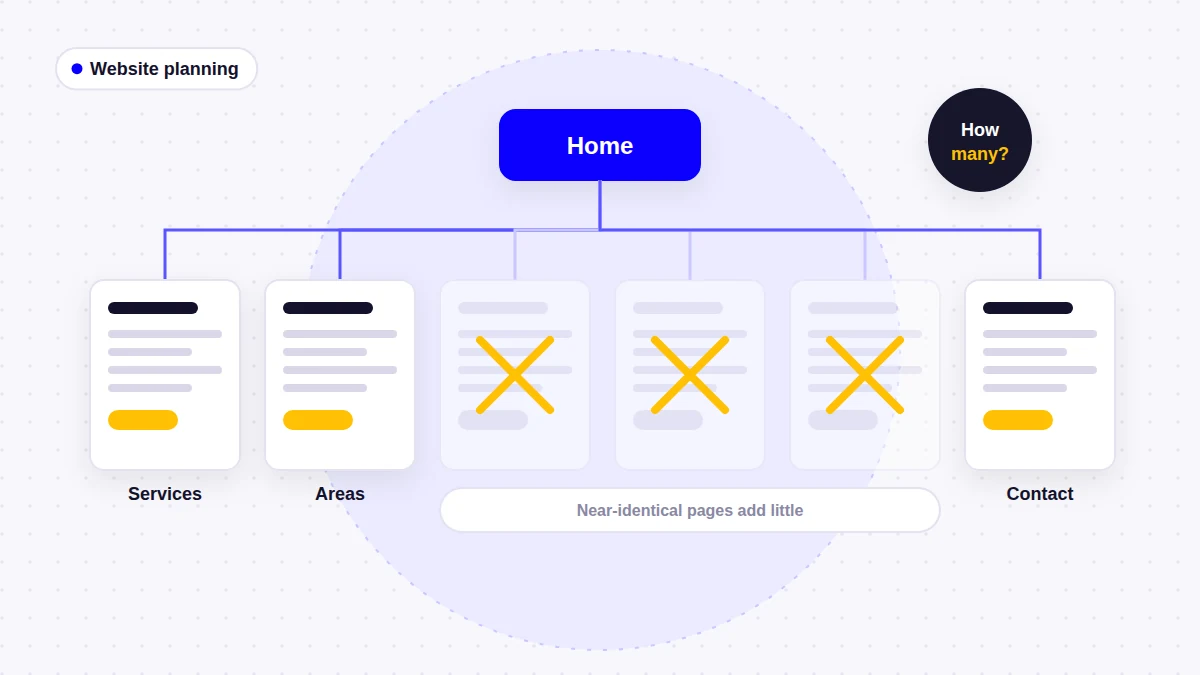
“How many pages will my website have?” is one of the first questions I get when planning a site, usually because the owner is trying to compare quotes. It is a fair question, but the number is an output, not a target. It comes from what you sell, who buys it, where you work and how much real proof you have. This guide shows how I work that number out, and where the sensible limit is.
- Quick answer
There is no ideal page count. Most small business websites land somewhere between 6 and 40 pages, and the right number depends on a few concrete factors:
- Start with a homepage, about page, contact page and privacy policy
- Add one page for each service that customers search for and buy separately
- Add separate pages for distinct audiences, such as residential and commercial, only if their needs really differ
- Add area pages only for places where you have something specific to say
- Add projects, reviews and FAQ pages when you have enough real material to fill them
- Merge or skip any page that would repeat another page with a few words changed
- More pages do not automatically mean better SEO; useful, distinct pages do
Why There Is No Ideal Number of Pages
Search for this question and you will find ranges from “5 pages” to “10 to 30 pages”, often in the same article. None of them come with evidence, because there is nothing to measure. Google evaluates pages one at a time against a search, not websites by their size. Its SEO Starter Guide says there is “no magical word count target, minimum or maximum”, and the same reasoning applies to page count.
What actually drives the number is the amount of distinct, useful information your customers need. A consultant with one service has very little. A contractor with ten services across two counties has a lot. My guide to what a small business website should include covers what goes on each essential page. This article answers the next question: how many of those pages you need, which ones deserve to stand alone, and when to stop.
The Core Pages Almost Every Small Business Needs
A few pages are close to universal. The real decision for each one is not “do I need this information?” but “does it need its own page, or can it live as a section somewhere else?”
| Page | Own page? | Notes |
|---|---|---|
| Home | Always | Routes visitors to the right service; it cannot replace the service pages |
| About | Almost always | Can be a homepage section for very new or one-person businesses |
| Services overview | When you have 5+ services | With two or three services, the menu and homepage can do this job |
| Individual service pages | One per main service | The pages that usually do most of the work |
| Contact | Always | Even if every page has a form, people look for this page |
| Privacy policy | Always, if you collect data | Forms, analytics and cookies all collect personal data |
That gives a floor of four to five pages before you add a single service page. For most service businesses, the service pages are where the count starts to grow.
Supporting Pages: Add Them When You Have the Material
These pages are useful, but each one has a clear condition. Without that condition, the same content usually works better as a section on an existing page.
| Page | Earns its own page when | Otherwise |
|---|---|---|
| Service areas | You travel to customers in more than one town | Mention your area on the homepage, contact page and footer |
| Projects or portfolio | You have at least six to eight real jobs with photos | Show a few photos on each relevant service page |
| Individual project pages | A job has a story: scope, problem, result | Keep it as a gallery item |
| Testimonials or reviews | You have enough genuine reviews to fill a page | Place two or three on the homepage and service pages |
| FAQ | Questions span many services (pricing, warranties, booking) | Put service-specific questions on each service page |
| Blog or guides | Someone will publish useful articles regularly | Skip it at launch; an empty blog looks abandoned |
| Terms, cookie policy, accessibility statement | You sell online, use non-essential cookies, or publish a statement you can maintain | A privacy policy alone is often enough for a simple brochure site |
| Financing, careers, warranty | You genuinely offer it and customers ask about it | Leave it out entirely |
Legal requirements vary by country and by what your site does, so check the rules that apply to you rather than copying another site’s footer. I would rather see one accurate privacy policy than four boilerplate legal pages nobody has read.
A Method for Working Out Your Page Count
When I plan a site, I build the page list from a short inventory of the business, not from a template. You can do the same with a spreadsheet or a sheet of paper:
- List the jobs you want to be hired for. Not everything you can do: the work you want more of. Put them in order of value to the business.
- Apply the separate-page test to each one (explained in the next section). Services that pass get a page. The rest are grouped under a broader service.
- List your audiences. If homeowners and property managers ask different questions and buy differently, they may need separate paths.
- List where you work, then mark the places where you have real projects, real reviews or real local differences. Only those are candidates for their own page.
- Count your proof. How many finished jobs with decent photos? How many genuine reviews? This decides whether projects and reviews are pages or sections.
- Collect the questions customers ask on the phone. Service-specific ones go on service pages; general ones may justify an FAQ page.
- Add the required pages: contact, privacy policy and anything else your situation calls for.
- Split the list into “launch” and “later”. Anything you cannot write well yet goes on the later list.
The total at the end of step 8 is your page count. It is often lower than owners expect for a new business, and higher than they expect for an established one with many services.
When a Service Deserves Its Own Page
Separate service pages are where most of the value in a service business site sits, because each one can match a specific search and answer a specific customer. But not every line on your price list needs a page. I use four questions:
- Do customers search for this service by its own name?
- Is the process, price or customer different?
- Can you write five or more useful answers about it?
- Do you want to be hired for it specifically?
If the answer is yes to most of them, the service gets its own page. If not, it becomes a section on a broader page. “Faucet repair”, “toilet repair” and “garbage disposal repair” might all sit on one general plumbing repairs page, while “water heater replacement” gets its own page because people search for it directly and ask very different questions.
Large service lists need grouping as well as pages. On the AAA Plumbing website, services are organized into water, sewer and drain, and remodeling groups, and specialist work such as sewer lateral replacement and hydro jetting each has its own page. On the Starhawk Roofing website, each of nine services has its own page, with roofing leading the menu and exterior services grouped underneath.
Separate audiences are a different decision
Some businesses need a split by customer type rather than by service. The Crestpoint Mechanical website separates residential and commercial HVAC work into their own sections, because a homeowner with a failed air conditioner and a facilities manager planning a project need different wording and different proof. If your two audiences ask the same questions, one set of service pages is enough.
When Location or Service Area Pages Make Sense
Area pages are where page counts most often get out of hand. Two types of page are easy to confuse:
- Location pages are for a real office, shop or branch that customers can visit. If you have three locations, three location pages are normal.
- Service area pages are for places you travel to. These need more care, because the temptation is to create one per town with nothing different on each.
For page count, the rule I follow is simple: one service areas page that lists everywhere you work, plus individual area pages only where you can say something specific. That could be projects completed there, local conditions that change the work, or services you only offer in that area.
Google’s spam policies describe doorway abuse with examples that include “pages targeted at specific regions or cities that funnel users to one page” and “substantially similar pages that are closer to search results than a clearly defined, browseable hierarchy”. Fifty town pages with swapped names fit that description. Your pages should also match the service area set in your Google Business Profile.
Worked Examples for Three Types of Business
These examples are illustrations of the method, not targets. Your numbers will move with your services and material, but the reasoning should look similar.
| Page type | Solo consultant | Local plumber | Multi-service contractor |
|---|---|---|---|
| Home, about, contact | 3 | 3 | 3 |
| Services overview | No (menu is enough) | Optional | 1 |
| Individual service pages | 2 to 4 | 6 | 8 to 10 |
| Service areas | None | 1 to 4 | 1 overview + 4 to 6 |
| Projects | Section or 1 page | 0 to 1 | 1 overview + 6 to 10 |
| Reviews and FAQ | Sections | 1 to 2 | 2 |
| Legal | 1 | 1 | 1 to 2 |
| Approximate total | 6 to 10 | 12 to 18 | 27 to 36 |
Solo consultant: 6 to 10 pages
Picture a bookkeeper or business consultant who works mostly remotely and offers two to four related services. There is no service area to explain and not much visual proof to show. The site needs a homepage that introduces the person early, a page for each service, an about page, a contact page and a privacy policy. Testimonials and a short FAQ work well as sections. The George Issa CPA website follows this pattern: a short menu, the advisor introduced on the homepage, and service pages covering tax preparation, year-round tax planning, bookkeeping and business advisory.
Adding pages here mostly adds maintenance. A blog only makes sense if the consultant will actually write for it.
Local plumber: 12 to 18 pages
Take a plumber offering six main services (drain cleaning, water heaters, leak detection, repiping, sewer lines and emergency plumbing) across one county. Each of those passes the separate-page test: customers search for them by name, and the questions differ. Add home, about, contact and privacy policy, one service areas page, and perhaps two or three area pages for the towns where the business has done the most work and can show it. A reviews page is worth having once there are enough real reviews. That lands between 12 and 18 pages.
Multi-service contractor: 27 to 36 pages
A remodeling contractor offering kitchens, bathrooms, basements, decks, additions, windows, siding and roofing to both homeowners and small commercial clients across two counties has much more to explain. The extra pages come from three places: more services, a projects section with individual project write-ups, and area pages for towns with a real track record. This is where a services overview page and a projects overview page earn their place, because the menu alone can no longer show everything clearly. The contractor website guide goes into the content of each section.
Notice what does not drive the count in any example: a desire to “look bigger”, or a page for every keyword variation.
Page Architecture: How the Pages Fit Together
Page count matters less than how the pages are organized. Most small business sites work well with a shallow structure of three levels:
- Level 1, main navigation: Home, About, Services, Service Areas (if you travel), Projects, Contact.
- Level 2, detail pages: individual services under Services, individual towns under Service Areas, individual jobs under Projects.
- Utility pages: privacy policy and other legal pages, linked from the footer rather than the main menu.
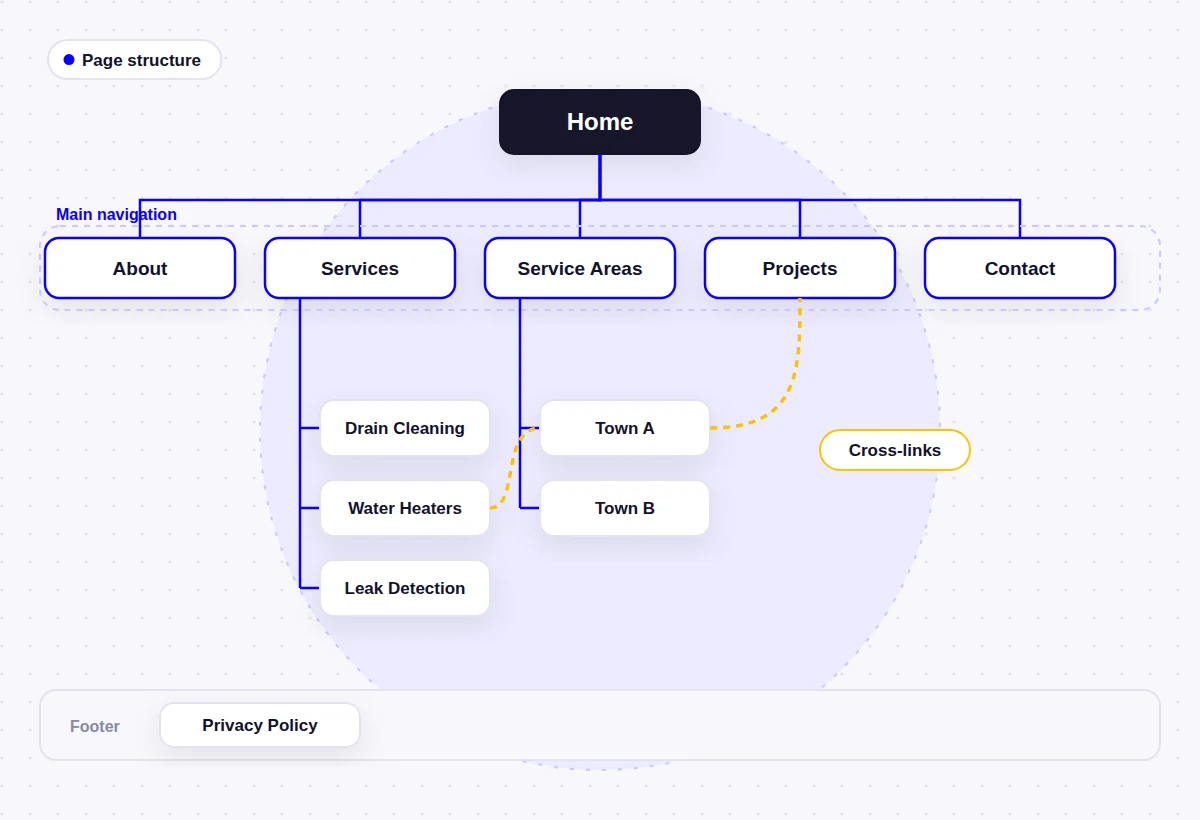
A few practical rules keep this structure clean as it grows:
- Keep every important page within two or three clicks of the homepage
- Use URLs that mirror the structure, such as /services/water-heater-repair/ and /service-areas/town-name/
- Group long menus under clear headings rather than showing twenty items at once
- Give each page one clear topic, so two pages are never competing for the same search
- Plan room for growth: a structure that works at 12 pages should still work at 30
If two pages do end up covering the same thing, Google’s documentation on consolidating duplicate URLs explains how to point search engines to the preferred version. In practice, merging the two pages and redirecting the old address is usually cleaner on a small site.
Internal Linking Between Your Pages
Internal links are how visitors and search engines move through the structure. Google’s link guidance says “every page you care about should have a link from at least one other page on your site”, and recommends descriptive anchor text (Google link best practices). On a service business site, the links I plan from the start are:
| From | Link to |
|---|---|
| Homepage | Each main service, the service areas page, a few projects |
| Service page | Related services, relevant area pages, matching projects, contact |
| Area page | The services offered there, projects completed there |
| Project page | The service it shows and the area it was in |
| Blog article | The service page it supports |
Use anchor text that says where the link goes, such as “water heater replacement”, rather than “click here”. A page that only appears in an XML sitemap but is never linked from another page (an orphan page) is a sign it either belongs somewhere in the structure or does not need to exist.
Do More Pages Mean Better SEO?
No. More pages give you more chances to match different searches, but only when each page answers a different need well. A plumber with a strong water heater page can appear for water heater searches that a single “Services” page would struggle with. That is the real reason separate pages help, and it has nothing to do with the total.
Google is direct about the opposite approach. Its guide to creating helpful content lists “producing lots of content on many different topics in hopes that some of it might perform well in search results” as a warning sign. Its spam policies define scaled content abuse as “many pages are generated for the primary purpose of manipulating search rankings and not helping users”, however the pages were created.
Duplicate content on its own is not a penalty. The starter guide says it is “inefficient, but it’s not something that will cause a manual action.” The cost is practical instead: similar pages compete with each other, and every extra page has to be written, kept accurate and maintained.
Every page should be the best answer on your site to one specific question a customer might have. If you cannot name that question, or another page already answers it, the page probably should not exist.
Thin Pages and How to Fix Them
A thin page is one that exists but gives a visitor very little: a heading, a stock photo, two generic paragraphs and a contact form. I see them most often when a site was built to a page count instead of a plan.
| Thin page | Useful page |
|---|---|
| Same text as other service pages with the service name swapped | Its own process, pricing factors and questions |
| Town name repeated in every heading | Projects, conditions or details specific to that town |
| Stock photos only | Photos of real jobs of that type |
| No clear next step | A call to action that fits the service |
| Not linked from anywhere except the sitemap | Linked from related services, areas and projects |
When I audit an existing site, each weak page gets one of four outcomes:
- Improve it if the topic matters and you have the material to write about it properly.
- Merge it into a broader page if it overlaps with another page, then redirect the old URL.
- Remove and redirect it if it has no purpose and no visitors.
- Keep it out of search (noindex) if visitors need it but searchers do not, such as a thank-you page after a form.
When Adding More Pages Stops Helping
There is no hard ceiling, but these are the signs that a site has more pages than it can support:
- Several pages share most of their text
- Pages show almost no impressions in Google Search Console after many months
- Nobody in the business can say what a page is for
- The main menu has more items than a visitor can scan on a phone
- Prices, staff names or service details are out of date on some pages because there are too many to check
- The blog has a handful of posts and then stops
WordPress can also create pages you never planned: tag archives, author archives and, on some older sites, separate pages for each uploaded image. A good SEO plugin and a quick review of what is being indexed keep these out of the way. This is part of what I check during a WordPress SEO setup.
Launch With What You Can Write Well, Then Grow
You do not need every page on day one. A new business can launch with the core pages and its most important services, then add pages as the material arrives. A sensible order is:
- Core pages and the services that bring in most of your work
- The service areas page and remaining service pages
- Projects and reviews pages, once you have enough real examples
- Area pages for towns where you have built a track record
- Articles that answer questions customers keep asking
Page count also affects budget, since each page has to be planned, written and built. My article on what a WordPress website costs for a small business explains how scope changes the price.
Frequently Asked Questions
How many pages should a small business website have?
There is no fixed number. Most small business websites need somewhere between 6 and 40 pages, depending on how many services, audiences and service areas they have, and how much real proof they can show. Work the number out from your business, not from a target.
Is a one-page website enough for a small business?
It can work for a very simple business with a single service, or as a temporary site at launch. Once you offer several services, a one-page site makes it hard to answer each customer properly and gives search engines one page to match against many different searches.
Do more pages help SEO?
Not by themselves. Separate pages help when each one answers a distinct search and customer need. Google warns against producing lots of content in the hope that some of it ranks, and its spam policies cover pages made mainly to manipulate rankings.
Should every service have its own page?
Every main service that customers search for and buy separately should, as long as you can write something useful about it. Small related tasks are usually better grouped on one broader service page.
How many service area pages should I have?
Start with one page listing every area you serve. Add individual area pages only for places where you have specific content, such as completed projects or local conditions. Pages where only the town name changes can fall under Google’s doorway abuse policy.
What pages can a small business skip at launch?
A blog, a separate FAQ page, individual area pages and individual project pages can all wait until you have enough material. A thin page published early does less good than a strong page published a few months later.
Can a website have too many pages?
Yes, if many of the pages are thin, overlapping or out of date. The problem is not the number itself but pages that compete with each other, confuse visitors and cost time to maintain.
Count Customer Needs, Not Pages
The right number of pages for a small business website is the number it takes to answer your customers’ real questions clearly, one page per distinct need. For a solo consultant that may be six pages; for a multi-service contractor it may be thirty or more. Both are right if every page earns its place, is linked into a clear structure and stays accurate.
If you would like help planning that structure, my WordPress website design service starts with exactly this page plan, before any design work begins. For the content of each page, the small business website checklist is the next place to look.
- About the author
Arslan Kalwar is a WordPress website designer and SEO specialist. He has worked with WordPress for more than eight years, completed over 1,200 projects, and contributed to WordPress core. Most of his work is for contractors, trades and other local service businesses. More about Arslan.
Planning a Small Business Website?
I plan WordPress websites page by page around your services, customers and service areas, so every page has a job to do. Send me a short description of your business and I will suggest a page structure that fits it.